
Many organizations that leverage analytical tools to drive their business struggle with inconsistent reports, regardless of the tools they use. A major, often overlooked cause is redundant data preparation: the same data is cleaned and transformed repeatedly by different teams and systems.
We frequently encounter clients with multiple versions of core datasets, such as a customer table, each with slightly different filters and transformations tailored to specific purposes. This not only wastes human and compute effort, but also makes it difficult and time-consuming to understand which version is correct and why they differ.
Fortunately, Power BI has a powerful feature that helps to solve this issue: Dataflows.
In this blog, we’ll show you how to make the most of this feature by introducing Gen2 dataflows, outlining real-world scenarios, and sharing best practices to complement our previous blog: How and When to Use Dataflows in Power BI.
Understanding Power BI Dataflows
Can you envision a method to extract all Power Query transformations from a semantic model and make them accessible for multiple models? It exists, and it is called Power BI Dataflows, which are configured using Power Query Online.
Using dataflows is similar to using Power Query in Power BI Desktop to transform data before using it in a report, as it essentially involves connecting to a data source and applying M-language transformations.
The primary difference between dataflows and semantic models is that dataflows do not contain table relationships, measures, or calculated columns; therefore, they are not used directly in reports, but rather as sources for semantic models.
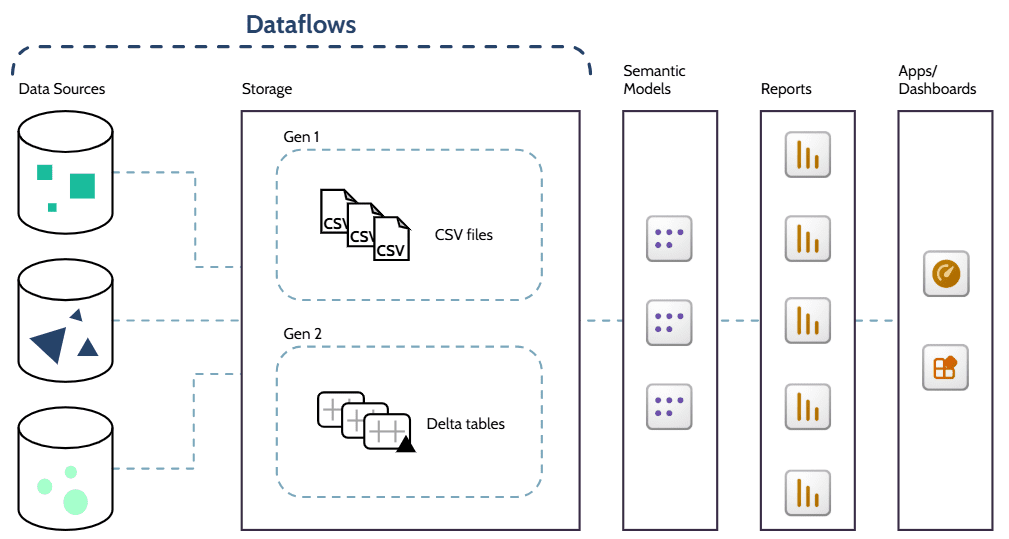
Two Generations
As Microsoft continuously develops and enhances its features, a new and more powerful generation of dataflows was introduced in 2023, with a similar purpose to the existing Gen1 dataflows, but with additional data engineering capabilities and some key differences:
Licensing: While Gen1 dataflows are available in Pro workspaces, Gen2 requires Fabric/Premium capacity.
Data Storage: With Gen1 dataflows, the data is transformed and stored in the Power BI Service using the Common Data Model (CDM), which comprises a folder structure that includes a metadata file and data files (typically in CSV format). On the other hand, when using Gen2 dataflows, transformed data is stored in lake storage, such as OneLake, using Delta tables. By combining columnar data files (unlike row-based CSV), indexes, and transaction logs, Delta tables are optimized for faster reading (especially selective columns), incremental updating, and sharing across Fabric and Power BI.
Connection: Instead of using the specific “Dataflow” connector, as in Gen1 dataflows, Gen2 dataflows connect directly to the underlying storage location using the OneLake connector, for example.
Permission: Gen2 dataflows support granular read, share, and build permissions, which control access instead of workspace role-based permissions.
Consumption: Gen1 dataflows can be consumed by semantic models, other dataflows, Excel, and other Power Platform items, while Gen2 dataflows can also feed SQL queries, notebooks, pipelines, and external tools.
Pros and Cons
Using dataflows as a way to reuse transformation logic brings several benefits to the organization:
Improves data consistency by using the same centralized tables across models and reports.
Eliminates duplicated effort by reusing already transformed tables.
Eases maintenance and reduces version drift, as updates are automatically propagated to all models.
Supports a clear separation of responsibilities according to team skills, allowing analysts to focus on modeling and visualization of data tables that have been cleaned and curated by engineers.
Reduces processing overhead and wasted resources by eliminating duplicate transformations.
However, it is important to consider their limitations:
Governance and change management are essential to prevent overlapping data flows and mitigate negative impacts from changes.
Dedicated ETL (extract, transform, load) tools are still required to support complex pipelines and heavy transformations, as the use of dataflows in those cases can be slower and more costly.
It may be necessary to update licensing or infrastructure to use Gen2 dataflows.
How phData Clients Are Leveraging Dataflows
Here at phData, we have been recommending the use of data flows to several clients in various scenarios. The most frequent scenarios are:
Standardizing Business Logic Across Teams
Frequently, companies rely on various software to handle different aspects of their operations, either due to cost, suitability, or preference. However, this can result in distinct databases with variations in analogous tables, for example, finance may have a different customer table from sales, each with its own definition of “active customer”.
To avoid discrepancies between reports caused by the use of multiple databases, differences in data preparation, or distinct business logic, we suggest, among other options, creating central dataflows that standardize transformations for metrics and handle data cleansing. In the example above, with a dataflow providing a single “Customer” table for both departments, it is possible for each department to classify “active customers” based on it or even to standardize that definition across the organization.
This creates a single version of the truth that can be used in several Power BI models and reports across the organization, or even to feed machine learning models, APIs, and other analytics tools when using Gen2 dataflows.
Self-Service Data Preparation Layer
With the growing understanding that data-driven decisions yield better results than those made based solely on instinct or individual perception, more business users are being required to create reports. However, these users are not, and they shouldn’t be, deeply skilled in working with complex BI (business intelligence) tools and raw data; therefore, the need for low-code tools, such as Power BI, and readable, ready-to-use data increases.
There are cases in which this ready-to-use data can be provided directly in other storage solutions, such as Snowflake, but in some scenarios, an additional fine-tuning data transformation layer is needed, and this is where dataflows excel.
Data engineers, IT teams, or even more skilled business users create data flows to transform data from various sources, including Snowflake, and create tables, such as a product catalog or a customer master table, that can be directly consumed by teammates in their reports, with confidence in data quality and recency.
Optimizing Power BI Service Performance
When multiple semantic models run the same transformations, there is unnecessary usage of the Power BI Service and data sources, which can result in overload and performance issues, especially when handling large datasets or performing heavy transformations.
Aside from optimizing reports themselves, there are several approaches that can be adopted in Power BI Service and data sources to improve performance and resource usage
Beyond optimizing the reports themselves, Power BI Service performance and resource usage can be improved through several approaches applied within it and data sources, such as pushing transformations upstream. In scenarios where it is not possible to perform these transformations even further upstream, using a single dataflow instead of multiple models may reduce engine usage, preventing crashes caused by overload, and even reduce costs, depending on the infrastructure.
For better results when handling large datasets with extensive historical data, it is recommended to combine this approach with incremental refresh, so that the full data history is loaded once, and at subsequent refreshes, only new and updated records are loaded.
Best Practices
To take full advantage of Power BI Dataflows, it is crucial to follow a strategic approach and some best practices, such as:
- Prefer using multiple linked, smaller data flows to handle large transformations rather than a single large data flow.
- Whenever possible, push transformations to the source database through query folding.
- Document, promote, and certify data flows so that users are aware of their existence, purpose, sources, refresh times, and dependencies. See this post to learn about data catalogues.
- Implement proper governance, change management, and naming conventions to enhance readability and prevent overlapping data flows and unforeseen impacts from changes.
- Schedule dataflow refreshes considering their dependencies and impacts on data sources and other data flows, using incremental refreshes when applicable.
Closing
As seen, well-designed data flows are a powerful feature for many organizations, as they can enhance report performance and data consistency, which are crucial for efficient data-driven decisions, while saving time and resources.

Ready to optimize your Power BI environment?
phData can facilitate the migration of queries from semantic models to dataflows and perform a comprehensive review of your ETL process to ensure the optimal utilization of dataflows and other tools tailored to your specific requirements.
FAQs
Why should I prefer Dataflows over Semantic Models?
Using a semantic model as a data source is possible; however, it is done using a live connection or DirectQuery (on composite models), which introduces limitations to calculations and results in worse performance due to differences in processing. These differences are even greater when comparing semantic models to the Gen2 Dataflows, which offer better processing for large data, can feed other tools and features such as Python notebooks, and provide enhanced monitoring capabilities.
phData can facilitate the migration of queries from semantic models to dataflows and perform a comprehensive review of your ETL process to ensure the optimal utilization of dataflows and other tools tailored to your specific requirements.
When not to use Dataflows?
It is not recommended to use dataflows when only one semantic model consumes the data, the transformations are minimal (such as simple filtering), you already have a curated data lake, or when you need to consume data directly from the source using DirectQuery, due to security reasons, for example.


