
Why Snowflake Cortex Agents fail before they reach production
Snowflake Cortex Agents are AI-powered agents that combine Cortex Analyst (text-to-SQL), Cortex Search, and other tools to answer natural language questions against your Snowflake data, running entirely within the platform so your data never leaves.
If you’ve built a Cortex Agent demo that fell apart on the third real-world question, you’re not alone. The root cause is rarely the LLM. Instead, it’s the absence of structure around it. No semantic layer for business rules, no evaluation harness for regressions, no repeatable process to get from demo to production.
Here’s what that looks like in practice. A COVID‑19 dataset has a column called CUMULATIVE_CASES (a running total that grows every day).
If the agent writes SELECT SUM(CUMULATIVE_CASES) instead of SELECT MAX(CUMULATIVE_CASES)you get a number thousands of times too large, reported as fact. A user who doesn’t already know the right answer has no way to spot the problem.
A well-built semantic view prevents this. But who validates the view before the agent uses it? Who tests against known-correct answers before production? Who catches regressions after a model update?
Those are pipeline questions, not tool questions. Snowflake gives you the pieces. The skills-first workflow gives you the two things that tie them together: a build path connecting each stage through shared context, and an evaluation loop that catches wrong answers before users do.
This post walks through how we built that workflow at phData using CoCo (Cortex Code), for ML engineers and data engineers who want a repeatable process for production Cortex Agents. phData is a Snowflake Elite Services Partner and seven-time Partner of the Year, and this workflow reflects what we’ve built and tested with customers.
How the Snowflake Cortex Agent skills-first workflow fits together
The workflow decomposes the agent lifecycle into ten discrete steps: five to build and deploy, five to evaluate and improve. A router tracks which steps are complete, which are stale, and which to run next:
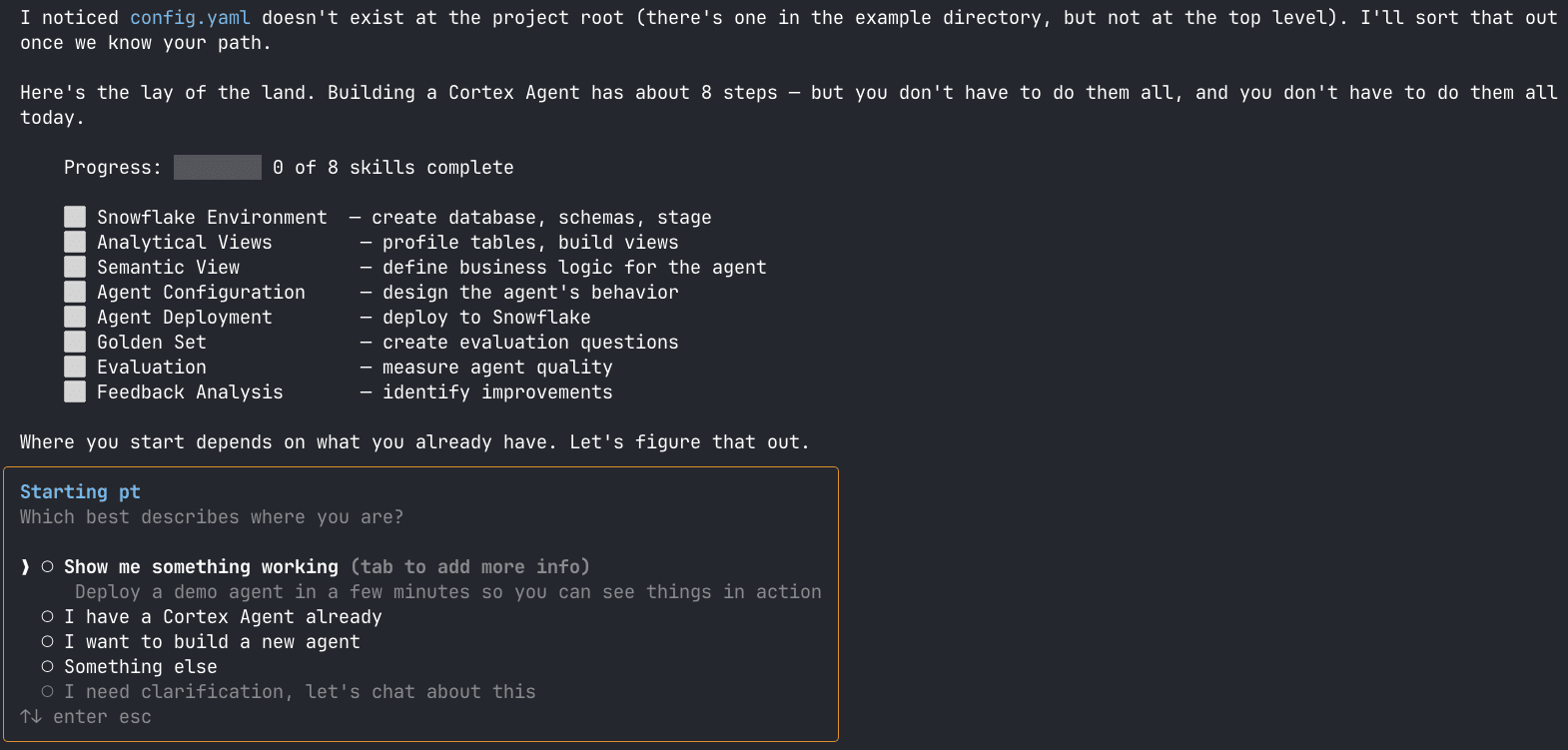
/agent-workflow after an initial evaluation run, seven steps complete, three evaluation-loop steps ready to go.The workflow is organized into two paths:

Under the hood, a subset of pipeline steps delegates to Snowflake’s own built-in skills — /semantic-view, /cortex-agent, and others — rather than reimplementing them. Cortex Code ships with these bundled skills, and our workflow wraps them with pipeline context — the shared memory layer shown in Figure 2 — so each step knows what ran before it, what changed, and what to do next. When Snowflake updates its best practices, your pipeline picks them up automatically because it’s calling the same skills, not a fork of them.
You invoke skills in two ways. Type a specific command, /agent-workflow setup, /agent-workflow evaluate , to jump directly to that step. Or type /agent-workflow and let the router guide you: it reads the pipeline context, checks every step for completeness and staleness, and presents an interactive menu with the recommended next action pre-selected, exactly what you saw in Figure 1.
What is a skills-first workflow for Cortex Code?
A skills-first workflow treats each stage of the Cortex Agent lifecycle as a first‑class skill in Cortex Code, Snowflake’s AI‑driven assistant for data engineering, analytics, ML, and agent‑building. Cortex Code understands your schemas, your RBAC model, and Snowflake best practices. It ships with bundled skills (such as semantic model creation) and can be extended with project‑specific skills that understand your templates and conventions.
Here’s the full architecture of our skills-first workflow:

Each skill is a guided command that implements one phase of the lifecycle. It reads context from the previous step, presents options, confirms before running DDL, and writes results back for the next skill. If you’ve used Makefiles or Taskfiles to orchestrate multi-step builds, the mental model is similar, except the “build steps” are interactive and context-aware.
The pipeline is resumable. If you already have a semantic model, start at create-agent. If you already have a deployed agent, jump straight to create-golden-set.
How to build a Snowflake Cortex Agent: The build path in practice
Let’s make this concrete with a COVID‑19 analytics agent built from four raw Snowflake tables (case counts, vaccinations, healthcare capacity, demographics) that needs to safely answer questions like Which countries had the highest case fatality rate? and What was the peak ICU bed demand in the US?
1. Bootstrap the environment
/agent-workflow setup
This skill scaffolds your Snowflake environment and creates three logical stages:
nonprod — Development and testing.
eval — A frozen data snapshot for reproducible evaluation.
prod — Production deployment.
The eval environment is critical: if evaluation runs against live, changing data, you can’t tell whether a score drop came from an agent regression or from new data your golden questions weren’t designed for. Freezing the data removes that ambiguity.
2. Build the analytical layer
Raw tables are almost never agent‑ready. Column names are cryptic, business rules are implicit, and relationships between tables are undocumented. Pointing your semantic model directly at raw tables is like asking someone to cook a complex meal from unlabeled ingredients; technically, it’s possible, but you’re going to get a lot of mistakes.
/agent-workflow create-views
This skill auto‑discovers source tables (e.g., ECDC_GLOBAL, OWID_VACCINATIONS, IMHE_COVID_19, DATABANK_DEMOGRAPHICS), profiles every column, and, based on user feedback, generates analytical views that explicitly define business logic.
For example, V_DAILY_CASES_DEATHS produces one row per country/day with cases, deaths, per‑100k rates, and rolling averages by joining ECDC_GLOBAL with demographics. V_VACCINATION_PROGRESS tracks daily and cumulative vaccinations, along with the percent vaccinated by country. Similar views cover healthcare capacity and country demographics.
This is the layer where business rules, like the CUMULATIVE_CASES aggregation from earlier, are defined in SQL, not prompts. If you skip this step and push that nuance into a system message, you’re building on sand. SQL is a much more reliable contract than natural language.
3. Build the semantic model
/agent-workflow create-semantic-view
This skill wraps Cortex Code’s bundled semantic-view skill and adds project‑specific intelligence. It reads the pipeline context, profiles actual column values, and enriches the semantic model with business‑level descriptions, synonyms, and pre‑validated SQL patterns.
For the COVID‑19 example, the resulting semantic model includes 4 tables, 27 dimensions, 19 facts, and 12 metrics — things like TOTAL_CASES = MAX(CUMULATIVE_CASES), AVG_CASE_FATALITY_RATE, and TOTAL_DAILY_VACCINATIONS. It also includes 10 Verified Query Repository (VQR) entries that define tested SQL patterns for common questions, dozens of column descriptions and synonyms (e.g., CFR → CASE_FATALITY_RATE_PCT, nation → COUNTRY_REGION), and join rules that insist on ISO_CODE instead of fragile country name matches.
Think of VQRs as the difference between giving someone a map versus telling them head roughly east. Instead of reinventing a complex multi-join aggregation every time, Cortex Analyst reuses and adapts the proven pattern.
But VQRs come with a tradeoff: each entry is additional context fed to the model alongside your dimensions, metrics, and synonyms. More VQRs mean richer guidance — until you hit a point of diminishing returns where the added context competes for the model’s attention rather than sharpening it. Snowflake notes that exceeding ~20 verified queries already impacts optimization performance. The game here is curation, not accumulation: prune entries that overlap, retire patterns the agent has generalized from, and prioritize VQRs that encode complex logic the model can’t infer from column metadata alone. We have a solution sketch for extending the self-improve flow to optimize VQRs based on golden-set results and user traffic. Stay tuned for Part 2.
4. Design the agent spec with templates
/agent-workflow create-agent
This skill uses a Jinja2 template system to separate what the agent does (variables) from how the spec is structured (templates). If you’ve used Helm charts for Kubernetes, the concept is the same: shared templates, per-deployment value files, consistent behavior enforced in one place.
A variables file might look like:
					agent:
  name: "COVID-19 Analytics Agent (Skills-First)"
  identity: >
    An AI epidemiological data analyst that helps users explore global
    COVID-19 data—case trends, death rates, vaccination progress, and
    healthcare capacity.

tools:
  - name: "COVID19Analyst"
    type: "cortex_analyst_text_to_sql"
    semantic_view: "SANDBOX.OMAR_CORTEX_AGENT_AI_ACCELERATOR_DEMO.COVID19_ANALYTICS_SKILLS_DEMO"
The base template then adds response-format requirements, tool‑selection strategies, guardrails (e.g. do not provide medical advice or predictions), and follow‑up question behavior. When you’re managing multiple agents, you get shared templates with per‑agent variable files and consistent behavior across the board.
5. Deploy
/agent-workflow deploy
Deployment isn’t a single CREATE OR REPLACE AGENT command and a prayer. It’s a three-stage pipeline where each stage has to pass before the next one runs:
Validate — Jinja2 templates compile into YAML specs, semantic models are checked against live Snowflake schemas, and eval snapshots are created. If a column reference is stale, you find out here, not in production.
Test — A temporary agent is deployed, tested against a handful of known questions, and torn down. If the smoke test fails, the pipeline stops. Nothing touches production.
Deploy — The production agent is created via
CREATE OR REPLACE AGENT, and observability views are deployed overSNOWFLAKE.LOCAL.AI_OBSERVABILITY_EVENTSfor request tracking and token metrics, and a Streamlit evaluation dashboard is published for reviewing scores.
The CI/CD smoke test (phase 4) is where the workflow draws the line between vibes-based evaluation — running a few questions by hand, eyeballing the answers, ship — and a rigorous framework. The smoke test replaces that gut check with a repeatable gate: deploy a temporary agent, run it against known questions, score the results, and tear it down. If it fails, the pipeline stops. Nothing touches production.
Native observability comes out-of-the-box with deployment. Every interaction is captured via GET_AI_OBSERVABILITY_EVENTS(), giving you a queryable trace without external tracing infrastructure — the same trace the evaluation loop will consume to debug failures and measure improvement.
Snowflake Cortex Agent evaluation: Making it a first-class citizen
Most agent projects skip evaluation entirely or treat it as a one-time manual step before launch. Without it, you can’t spot failure categories, confidently refactor, or tell whether a change improved or regressed the agent. In the skills-first workflow, evaluation is a first‑class stage with its own skill, data, and metrics.
The golden dataset
A golden dataset is a curated set of questions with known, correct answers and clear expectations. Think of it as the test suite for your agent. You wouldn’t ship a library without unit tests, and you shouldn’t ship an agent without a golden dataset.
It’s organized into tiers of increasing complexity. The distribution is intentional, roughly 40% foundational, 30% operational, 20% analytical, 10% adversarial. Most real user questions are straightforward, so most of your test coverage should be too. Not every tier expects perfection. Foundational and adversarial questions demand 100%, the first because failure indicates a broken model, the second because the correct response to ambiguity is caution, not confidence. The middle tiers allow some margin: 95% for operational queries where join-complexity introduces room for error, 90% for analytical questions that push the boundaries of what text-to-SQL can reliably handle.
Tier | Name | Description |
|---|---|---|
T1 | Foundational — Single-table, basic aggregations. | Foundational Retrieval: Focuses on single-table queries, basic counting, simple aggregations (like |
T2 | Operational — Multi-table joins, date grouping. | Operational Analysis: Queries that require multi-table joins, multi-dimension grouping, and time-series analysis (e.g., Weekly trends, Year-over-Year comparisons, or date groupings). |
T3 | Analytical — Cross-domain, complex filters. Correlations, statistical, percentiles. | Complex Analytical & Correlative: Involves combining data across domains, complex, multi-condition filtering, statistical functions (like percentiles), or correlation analysis. |
T4 | Adversarial — Ambiguous metrics, edge cases, double-counting traps, boundary conditions. Pass threshold is 100%. | Adversarial Robustness: Questions explicitly designed to test the agent’s ability to handle ambiguous language, resolve known data pitfalls (e.g., distinguishing between cumulative vs. snapshot data like |
/agent-workflow create-golden-set
This skill guides you through authoring questions, verifying SQL, and storing everything in a versioned GOLDEN_SET_QUESTIONS table. Include all four tiers, guardrail questions the agent must refuse (e.g., future predictions, medical advice), and edge cases around dates, nulls, and ambiguous terms.
Running the evaluation
/agent-workflow evaluate
Under the hood, evaluation is powered by TruLens, an OpenTelemetry-native (OTel) LLM evaluation and tracing framework maintained by Snowflake. TruLens instruments agent calls capturing plans, tool calls, SQL, and responses, and applies LLM‑as‑judge metrics to score each interaction along several dimensions.
Evaluation runs in two phases: first, execute every question in the golden dataset against the deployed agent and capture full traces; second, score those traces with a configurable set of metrics.
The metrics that matter for Snowflake Cortex Agent quality
The evaluation framework includes 17 custom metrics that we’ve curated across accuracy, relevance, quality, and performance categories. Here are the ones we find most informative in practice.
Quality metrics tell you whether the agent gives correct, faithful answers:
-
answer_relevance— Does the response actually address the question asked? -
factual_correctness— Do the numbers match expected values (with tolerance)? -
response_data_fidelity— Do the textual claims match the agent’s own SQL results?
Operational metrics tell you whether the agent is behaving correctly:
-
latency— Response time against your SLOs. -
guardrail_compliance— Does the agent refuse out‑of‑scope questions?
Structural metrics give you a holistic view:
-
diagnostic_summary— A meta‑assessment summarizing all other signals.
response_data_fidelity deserves special attention. I’ve seen cases where the SQL and query results were correct, but the natural language summary misstated the numbers, like a news anchor reading the wrong graphic on-screen. TruLens catches this by extracting numbers from both the SQL result and the response text, then checking that they agree.
Raw metric scores are useful for debugging, but composite health scores are what you actually act on. The pipeline computes an overall score per question and per run, then applies auto‑fail rules: diagnostic_summary < 0.40 triggers an auto‑fail, guardrail_compliance = 0.0 means the agent answered something it should have refused, and groundedness < 0.75 combined with answer_relevance < 0.87 flags a critical violation. These guards prevent a “good average” from masking a few catastrophic failures.
The continuous improvement loop
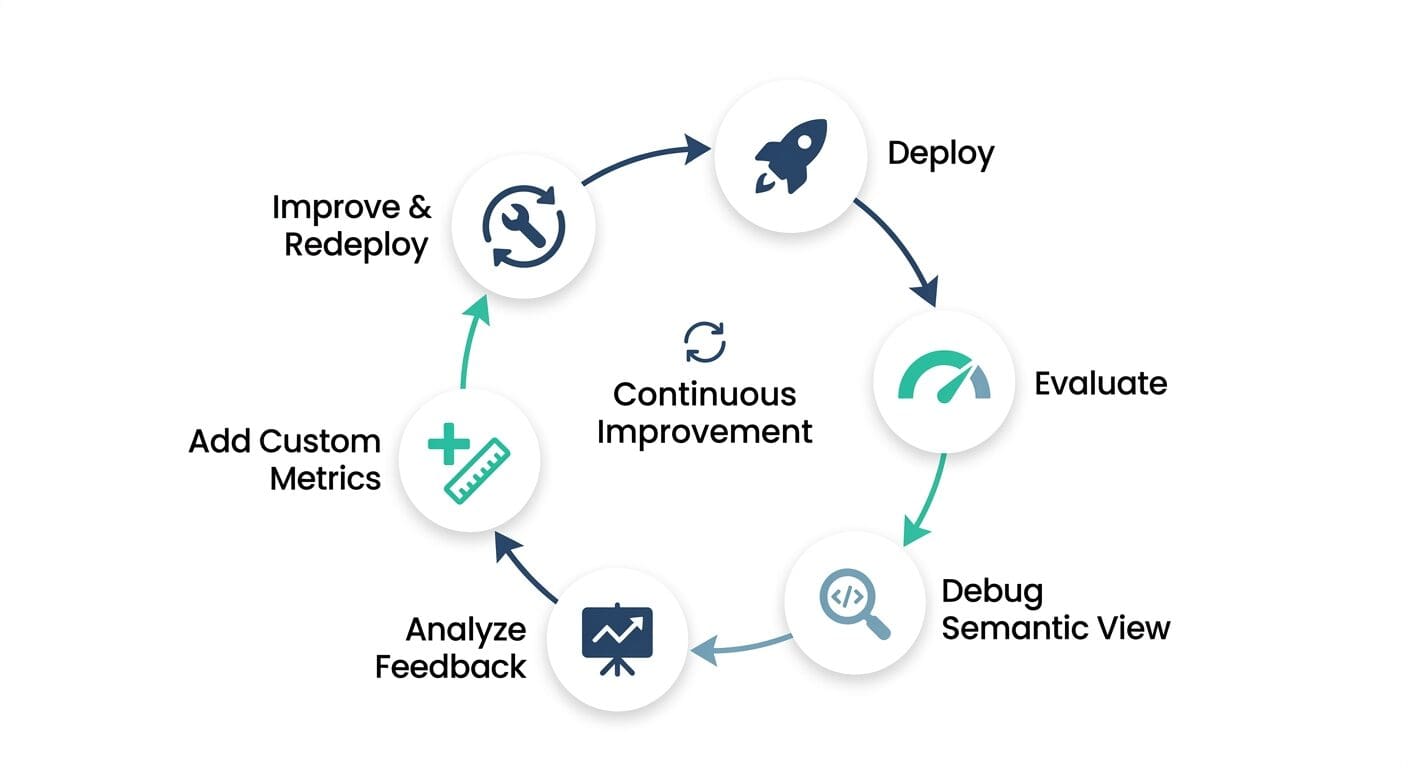
The pipeline also deploys a Streamlit evaluation dashboard that surfaces these results in a single view. Instead of digging through raw TruLens output or querying observability tables by hand, you get a report with run-level metrics (overall average, pass rate, health score), critical gate violations flagged in-line, threshold bands per question, and tabs to drill into aggregate metrics or inspect individual questions. It also tracks metadata like branch, commit, and duration — so when you’re comparing a feature branch against main, you can see exactly which build produced which scores.
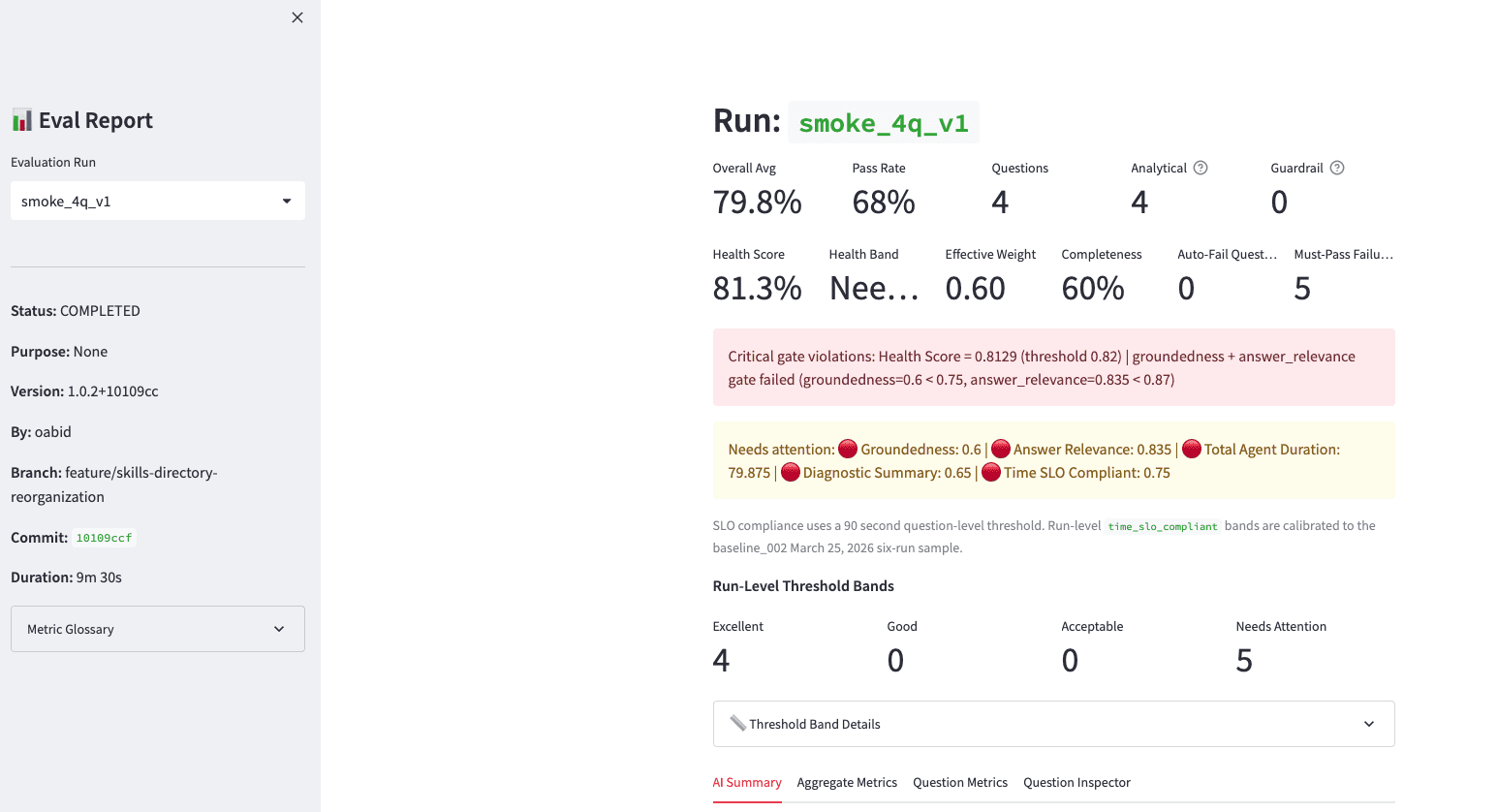
The real value of the skills-first workflow isn’t any single step — it’s the fact that the steps form a closed loop:
Deploy with
/agent-workflow deploy.Evaluate with
/agent-workflow evaluateagainst the golden set.Debug with
/agent-workflow debug-semantic-view— if evaluation surfaces fidelity or groundedness issues, this skill traces them back to specific semantic model problems and proposes targeted YAML fixes.Analyze failures with
/agent-workflow analyze-feedback— cluster low‑scoring questions, highlight recurring failure modes (time filtering, joins, guardrails).Improve the semantic model, agent instructions, or metrics based on what you learned. If the built-in metrics don’t capture a quality dimension specific to your domain (say, financial accuracy or regulatory terminology), use
/agent-workflow add-eval-metricto design custom LLM-as-judge metrics with calibrated rubrics — no need to modify the core framework.Redeploy and re‑evaluate to confirm improvements without regressions.
Because each step is a skill with shared context, you can re‑run just the parts you changed. All artifacts are also branch‑aware — on feature/xyz, your agent becomes COVID19_ANALYTICS_AGENT_SKILLS_FIRST__FEATURE_XYZ, so you can experiment, deploy, and evaluate in isolation without touching production. You can even rejudge past runs with new metrics (/agent-workflow evaluate rejudge --run-name <run>) without re‑invoking the agent, since TruLens already captured full traces.
Get started
phData Forge is redefining how we deliver, and this skills-first workflow is how we’re bringing it to Cortex Agents.
With this accelerator, we’re delivering production-grade Cortex Agents faster and more affordably than ever, from raw tables to a deployed, evaluated agent in days, not weeks. The pipeline is fully resumable: start from scratch for a net-new project, or drop in at create-agent or create-golden-set if you already have artifacts in place.

Want to see the full pipeline in action?
Our team will walk you through the accelerator, showing how it applies to your data and providing a roadmap tailored to your semantic model and data.
FAQs
What if I already have semantic models built?
You don’t have to start from raw tables. If you already have Cortex Analyst semantic views, point /agent-workflow create-agent at your existing semantic view, use /agent-workflow deploy to create a Cortex Agent backed by that model, then run /agent-workflow create-golden-set and /agent-workflow evaluate to add evaluation and observability on top. The pipeline context records where you entered the workflow, so downstream skills know what’s already in place.
What is a Snowflake Cortex Agent?
A Snowflake Cortex Agent is an AI-powered agent built natively in Snowflake that combines Cortex Analyst (text-to-SQL), Cortex Search, and other tools to answer natural language questions against your data. It runs entirely within the Snowflake environment, so your data never leaves the platform. Cortex Agents are configured via agent specs that define tools, guardrails, and response behavior.
Why do Snowflake Cortex Agents fail in production when demos work fine?
Demos test a narrow set of expected questions against clean data. Production agents encounter ambiguous phrasing, complex aggregations, and data with implicit business rules (such as cumulative vs. daily counts) that the semantic model doesn’t account for. Without a structured build path and evaluation harness, those gaps don’t surface until users hit them.
How long does it take to deploy a production Snowflake Cortex Agent?
With phData’s skills-first workflow, the typical path from raw tables to a deployed, evaluated Cortex Agent takes days rather than weeks. The pipeline is resumable: if you already have a semantic model or agent spec in place, you skip to the relevant step and build from there.