

Snowflake announced the general availability of semantic views at Snowflake Summit 2025. This new feature allows users to create business-friendly data models as schema-level objects natively in Snowflake.
You may be asking, “Why now for semantic views? Semantic models are not new.”
Correct, Snowflake is not the first to release the concept of semantic models.
Many BI tools like Sigma, Tableau, and the popular transformation tool, dbt Cloud, have their own semantic layers. However, phData believes there is value in having the semantic model as close to your data as possible, and nothing is closer than sitting in the same schema as your data.
In this blog, we’ll cover Snowflake Semantic Views, why they are needed, and how to get started with tips, best practices, and current limitations.
Snowflake Semantic Views: What Are They?
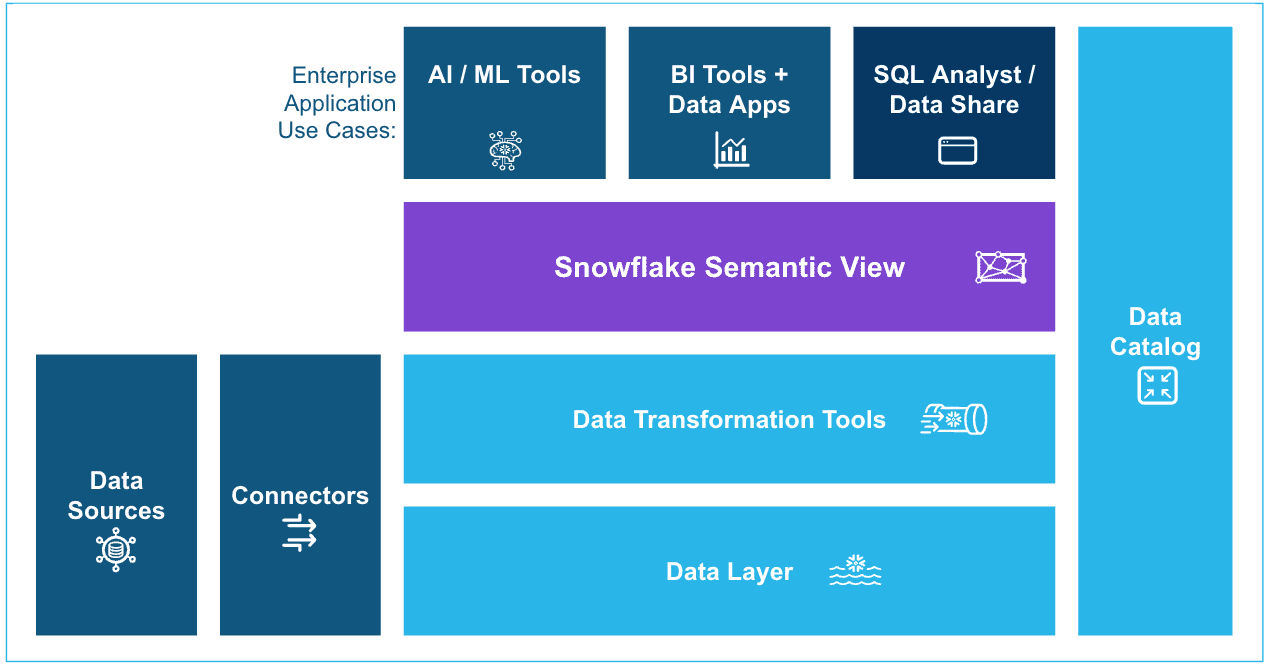
Snowflake Semantic Views are new SQL objects that provide a business-friendly layer to define your data. From business entities and the relationships between them, to facts and dimensions that build metrics – all the metadata needed to provide AI and BI users the context to understand your data.
How Semantic Views Solve Real Business Problems
There are two key use cases that a semantic model supports:
AI (e.g., LLMs in Cortex Analyst)
Business Intelligence (BI) teams and tools
Let’s dive into the Artificial Intelligence (AI) use case first.
Semantic Views for AI
It’s no secret that AI is heavily leveraged in organizations, specifically around data analytics and gathering insights. However, without a semantic model, LLMs are not accurate enough for real-world business question complexity. Since LLMs are pre-trained on general internet knowledge, they will not know the complex details of how a specific organization structures its data and internal business terms.
This could lead to hallucinations and incorrect answers, which negatively impact the business. For example, if a user asked for a company’s total sales, an AI may return just the sum of all retail sales. However, the business defines total sales as retail sales + wholesale sales – returns. Without the semantic view to guide AI to the correct definition, it will simply guess and be confident with its incorrect answer.
Semantic Views for BI Teams
For business intelligence teams, the semantic model offers a consistent definition of metrics and informs BI tools on how to join data together. While many BI tools have their own built-in semantic layer, if an enterprise deploys multiple BI tools, that semantic model needs to be duplicated multiple times, and keeping them in sync is not likely to happen.
The advantage of Snowflake Semantic Views is they provide a central semantic model right next to the data they describe. This means it is far easier to maintain and build trust for AI and BI.
Getting Started: How to Narrow Your Scope
How you approach building semantic views depends on the size and maturity of your analytical data. If you have a large, mature enterprise data warehouse consisting of clean facts and dimension tables, then build a semantic view for each business domain (e.g. sales, marketing, inventory). These semantic views should focus on relationships between tables and building calculated metrics from the facts.
On the other hand, if you have a small set of data but it is in fairly raw form, you will want to build some standard SQL views on top first. Use these views to rename columns into friendly names, convert data types to be more appropriate for reporting, and join complementary tables into a single cohesive data set. This will keep the logic in your semantic view from getting too complex and forcing you to alias everything to make it understandable.
In either case, make sure to focus on a reasonable scope. Don’t boil the ocean! Start with a prioritized domain (“the 20% of data that answers 80% of questions”) and gradually add more after each one is productionalized.
Building Semantic Views in Practice
Once you have determined the focus of your first semantic view, use the Cortex Analyst to accelerate building it. If all of the tables and views supporting your semantic view reside in the same Snowflake schema, then choose that same schema to store the semantic view. Otherwise, pick the most appropriate schema for your semantic view (this could be a centralized schema for all semantic views if you like).
TIP: Leave the description blank for now, and Cortex can provide one for you after the view is built.
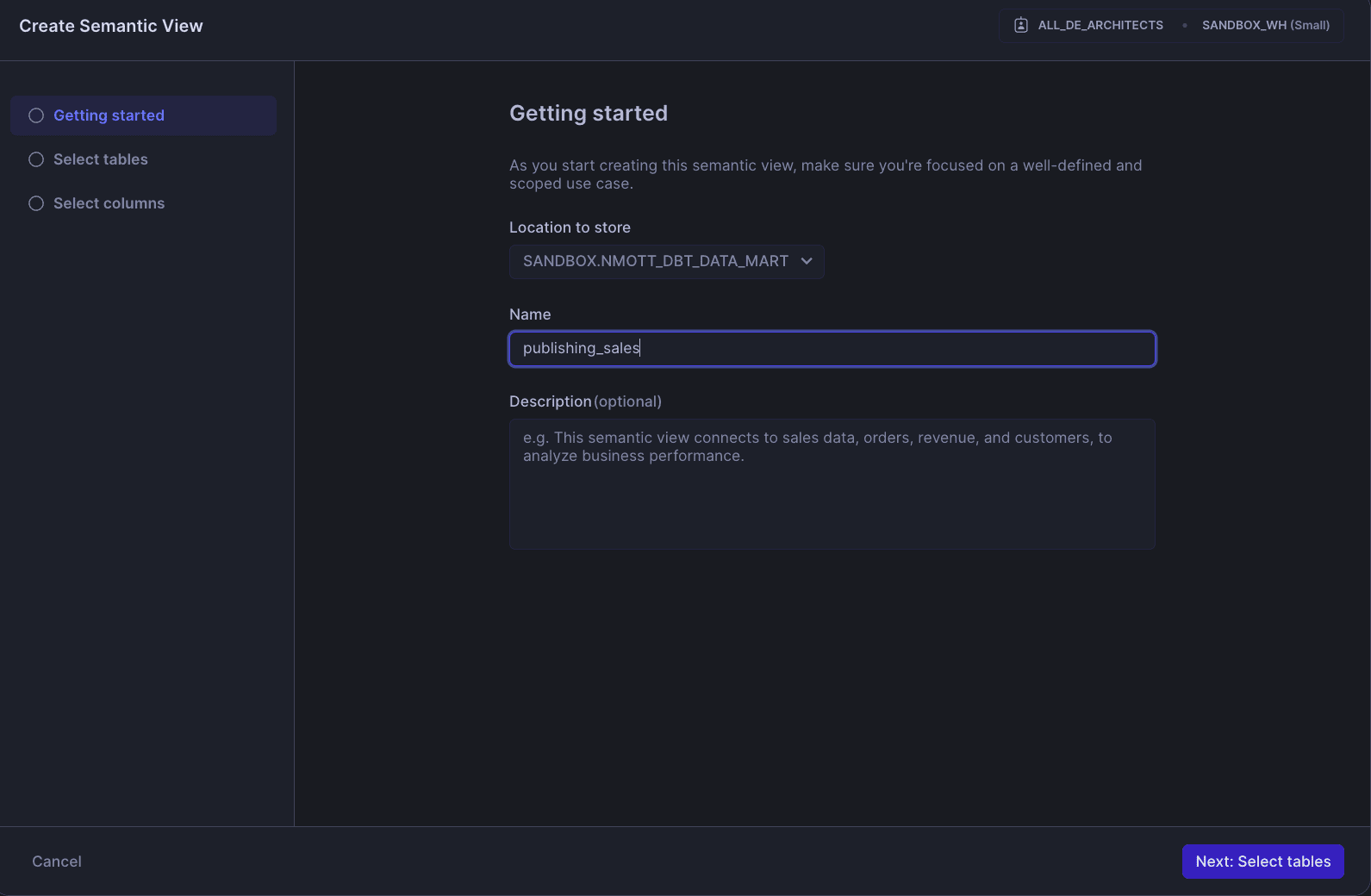
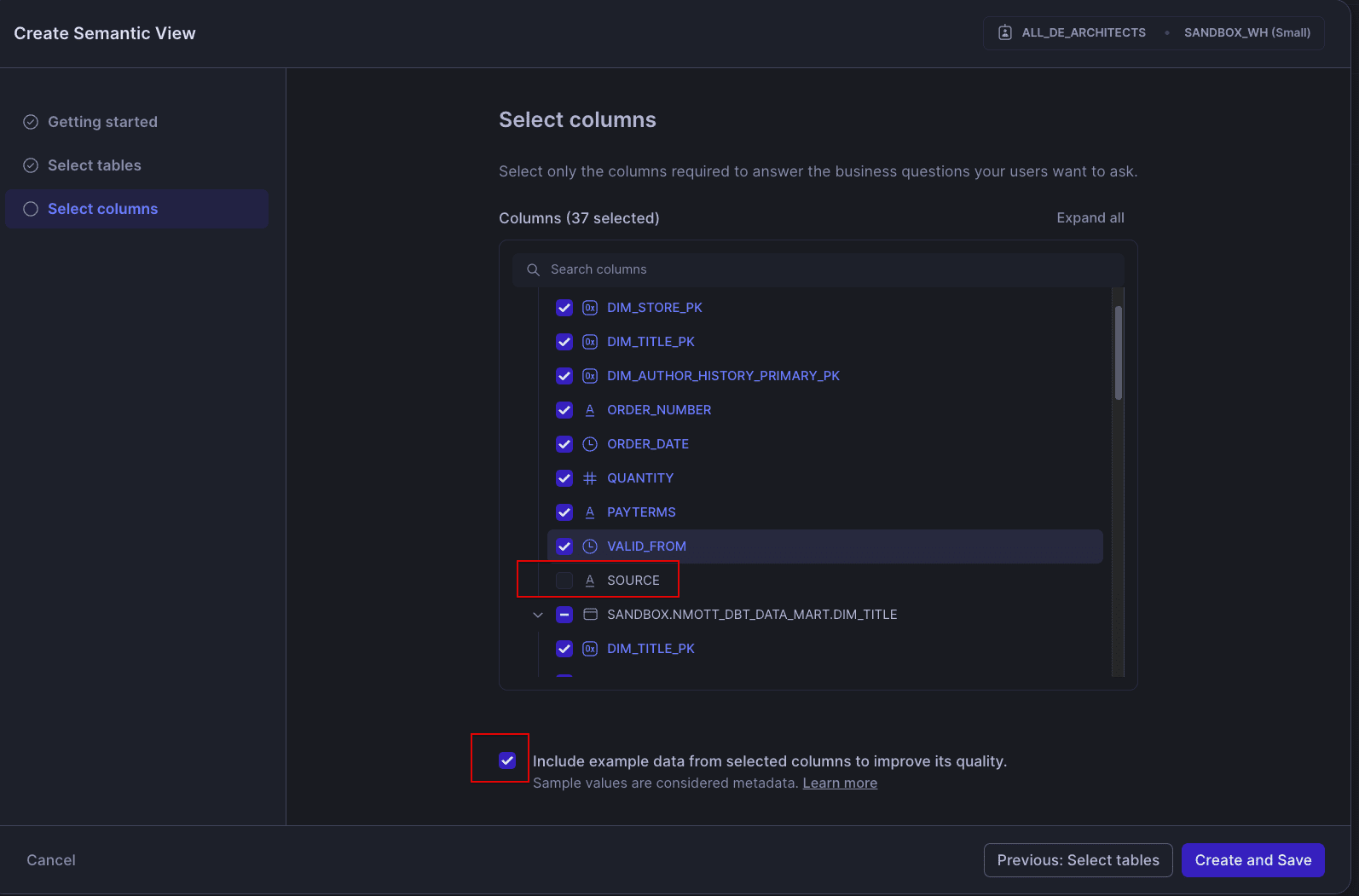
In the Cortex Analyst GUI dialog, give your view a name, then on the next screen, select all the tables and views that will be included in the semantic view. On the column selection screen, be sure to exclude any audit columns that are not useful for analytics and may just confuse AI and BI teams.
Also, make a note of the check box for sample values. If you have sensitive or PII data included in your view, you’ll want to immediately scrub those examples after generation or just uncheck the box.
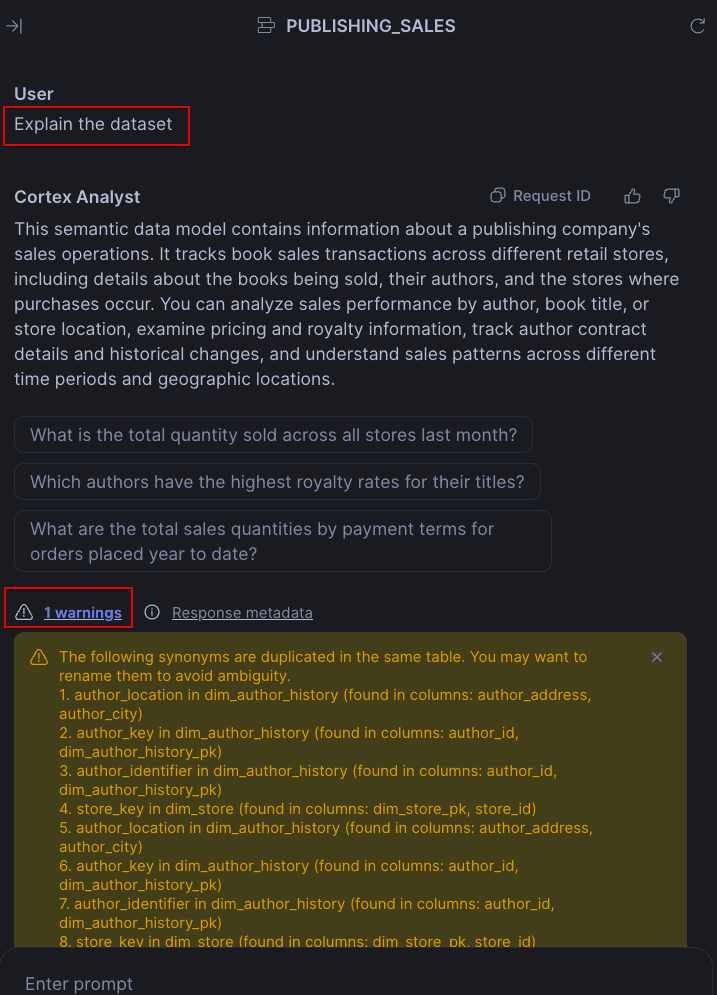
Once Cortex has finished building the initial semantic view creation, ask Cortex to explain the dataset. This will provide a few key things:
A nice starting point for the description of your semantic model (recommend officially adding it as a comment to your view).
Any warnings about your model (e.g., duplicate synonyms in the same table).
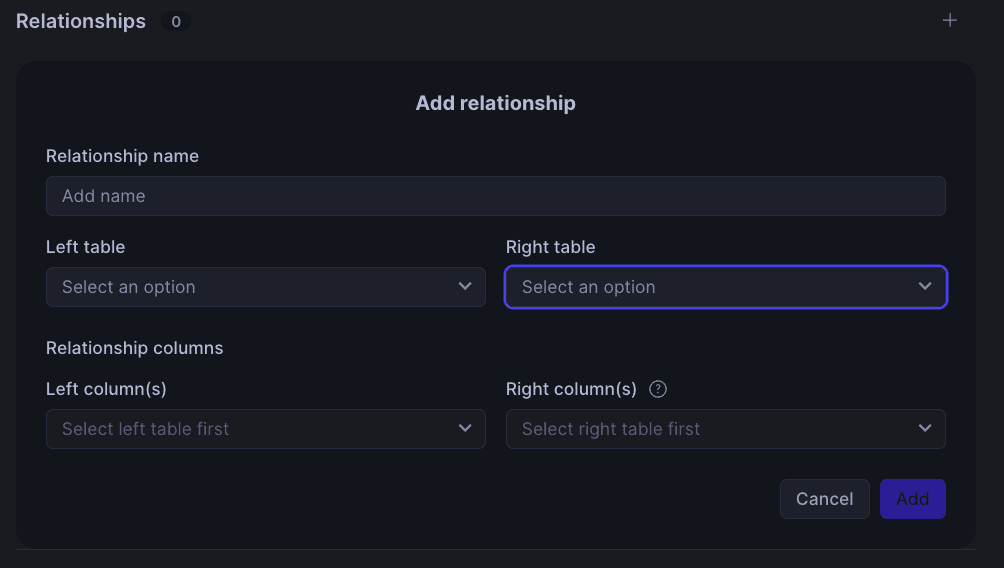
If your semantic view has multiple tables, it is likely that Cortex did not add any relationships. You will want to add those now, which can be done in three different ways (this is true for any change you want to make to your semantic views, not just relationships):
Use the Cortex Analyst GUI to pick from drop-down options (need to hit the Save button when done).
Edit the YAML file in the Editor (need to his the Save button when done).
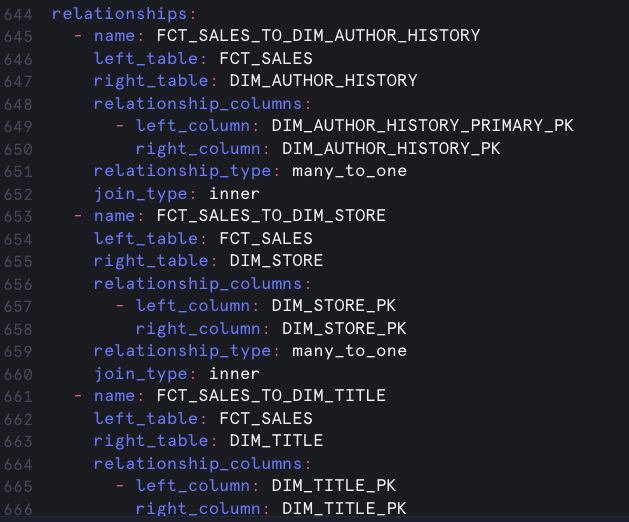
Edit the semantic view in Snowsight by adding the relationships section.

Continue to review the semantic model either in the UI, YAML, or SQL view mode. Ask Cortex some questions about your data and review the queries it is building. If more warnings pop up, address them as well.
Tips & Best Practices from phData
Validate: Work with your end users and SME’s to ensure the metrics are accurate. Ask several different questions of your data and validate that the answers returned match what would be expected. It is important to spend as much time as possible building confidence that the semantic view will guide users to correct answers.
Monitor: Develop automated processes to read and monitor the Cortex Analyst logs. Have it raise alerts if there are too many errors, warnings, increased latency or negative feedback (thumbs down). It is a good idea to also check for accuracy by having “unit test” questions. These are questions that should always return the same answer and you can verify Cortex is getting it correct.
Version Control: After the initial semantic view is created and validated, it should be put into a version control system like Git. This way, any future changes to the semantic view are captured and can be rolled back if negative outcomes occur. It is important to treat semantic views just like any other data object in your pipeline.
Maintain: As you build up a library of semantic views, it will become a challenge to ensure they are maintained and continually perform accurately. This has prompted the emergence of a new role called an Analytical Context Engineer (ACE). ACEs are accountable for maintaining the accuracy of all AI answers and dashboards. They achieve this by capturing, governing, and continuously updating the business logic within semantic models.
Automation: Do not attempt to do everything manually! It is going to be important to unify the information in your semantic views with other similar metadata found throughout your organization (e.g., Snowflake table comments, data catalog documentation, BI layer definitions). Set up automation to keep your metadata in sync. This may require defining one as a single source of truth or using a pub/sub model.
Governance: Semantic views cross the boundaries between IT and Business. It is essential to clearly define who will be responsible for semantic curation in the long term. Make sure everyone involved knows what is expected of them. This also includes Role-based Access Control (RBAC) design. Semantic views expose data, so they need to be secured like any other database object.
Known Limitations & Watch-Outs
As of the time of this blog writing, Snowflake Semantic Views cannot be used in replication. So if you have the database holding your semantic views set up for replication, a separate process will be required to sync them to the other account. This replication limitation also applies to data sharing. While the sharing of semantic views is possible (private preview), it cannot be part of a listing with auto-fulfillment or shared across regions.
Another preview feature is querying semantic views. Snowflake has added a new syntax to the FROM clause of an SQL statement. However, the values returned are limited—you must include either a dimension or metric (no direct facts), and your query request needs to align with how the metrics are defined in the view.
Lastly, Cortex Analyst has some size limitations. The underlying YAML file (see FAQ for more details) needs to be under 1 MB in size. After Cortex Analyst removes sample values and verified queries (those are processed separately), the remaining model cannot exceed 32K tokens—roughly 4 x 32K characters.
Closing
Snowflake Semantic Views offer a powerful way to centralize your business logic directly within your data platform, ensuring consistent definitions for both AI and BI initiatives. By adopting semantic views, you can enhance data discoverability, improve the accuracy of LLM-driven insights, and unify metric definitions across various BI tools.
Now that you understand the immense value and practical application of Snowflake semantic views, we encourage you to start experimenting with them in your own environment, leveraging phData’s best practices to build trusted and highly performant data models.

Operationalize AI with a Trusted Semantic Layer
Turn your Snowflake Semantic Views into governed, business‑ready insights and production outcomes with phData’s proven approach. Get practical frameworks and patterns you can apply immediately.
FAQs
Do semantic views replace the previous Semantic Models in Snowflake?
No, they currently exist side-by-side. When in the Cortex Analyst UI, you will see two tabs, one for Semantic views and one for Semantic models. The Semantic Models were first released with Cortex Analyst in 2024-Q3. The main difference between them is that semantic views are also created as a schema-level object, whereas semantic models are just YAML files stored in a Snowflake stage.
However, when interacting with a semantic view in Cortex Analyst, you can click Edit YAML, and you will see that behind the UI is still the same YAML file from the semantic model. Snowflake handles keeping your semantic view and YAML file in sync automatically.
Do Semantic Views replace the need to add comments to tables and columns?
No, not entirely. If you already have comments on your tables and columns when you generate a semantic view, Cortex Analyst will leverage that information. There is no guarantee that it uses the same exact verbiage, but in our experience, it will be very close. However, after the semantic view is created, Cortex will only use that to answer questions. There is no automatic mechanism to keep table/column comments in sync with the semantic views, but it would be advisable to put processes in place to ensure that.


