There has been rising pressure from organizations for increased efficiency within PeopleOps/Human Resources (HR). With a remote work culture, hiring teams are getting hundreds of applications when they may have once received only 10. Employees and employers alike want personalized learning to reduce taking mundane standardized courses at the wrong skill level. These are just a couple of the challenges that can be solved by using AI.
In this blog, we’ll uncover why and how PeopleOps and HR teams are using AI, what the benefits are that employers and employees are seeing with AI usage, and what the top technologies are that can be used to implement these use cases and save your company money while ensuring your employees’ work satisfaction.
Why Use AI in PeopleOps and HR?
The use of artificial intelligence and machine learning in HR can improve how you hire, manage, and support your workforce. Using data from HR systems and employee interactions can reveal insights that inform better business decisions and lead to happier employees.
AI can be used to help companies answer big questions like:
Who should we hire next, and when should we make the hire?
How can we enhance employee engagement and reduce turnover?
How should we adjust staffing levels in response to changing business demands?
The notion actually sounds simple, but being able to use AI to master these questions can make a huge difference in an organization.
How AI Can Help PeopleOps and HR
The results of using AI in the workforce extend across the entire employee lifecycle, from recruiting and hiring to retention. Let’s dive deeper into a few ways that it helps businesses operate smarter:
Smarter Hiring Decisions
AI-powered recruiting tools can screen thousands of resumes in seconds, flagging candidates who best match role requirements. These tools are continually improving at matching the right people with the right jobs. They reduce bias and accelerate hiring, letting recruiters focus on human interaction rather than spending all their time manually reviewing resumes. Not only will you be more likely to get the right candidate for the job, but you’ll also be able to get your new person on the job faster.
Predictive Workforce Planning
Scheduling staffing has been tricky in the past. Utilizing historical trends can be helpful on their own, but there is much more that goes into the ebbs and flows of business demand. Machine learning models can be used to analyze not only historical data but also seasonal trends, business forecasts, marketing campaigns and promotions, internal mobility patterns, and even external labor market data, such as wage inflation and industry hiring trends, to accurately predict future staffing needs. This allows leaders to plan ahead, reduce overtime costs, and prevent over or understaffing.
Enhanced Employee Engagement
Employee burnout or general dissatisfaction can kill even the best company. If your employees aren’t happy, their work is going to decline, or you’ll lose them to another firm. AI tooling can now be built to monitor communication patterns and survey data, measuring engagement and detecting early warning signs of burnout or dissatisfaction. With these trends in hand, companies can proactively address issues before they lead to turnover.
Personalized Learning and Growth
Traditionally, within corporate learning, training programs were one-size-fits-all. Employees would take standardized modules that didn’t reflect individual skill levels or career goals. However, by using predictive analytics, companies can now deliver personalized learning experiences tailored to each employee’s unique needs and potential.
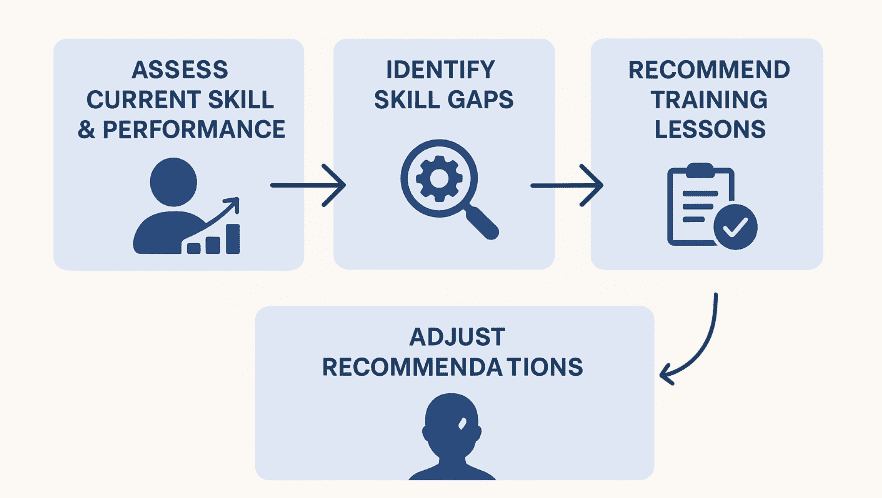
AI and ML systems can be designed to assess an employee’s current skills and performance, identifying skill gaps based on role requirements or company goals. With these gaps, it can then recommend specific training lessons and adjust those recommendations as the employee progresses. This provides a clear path for employees to learn what they need to and faster upskilling of the workforce for companies.
Top AI Technologies for PeopleOps and HR
Now that we understand the challenges that can be addressed by utilizing AI, we can examine how these are implemented. This next section will highlight the top technologies involved and their role in HR use cases.
Low/no-code AI Agents
This group of technologies is designed for individuals with little to no experience in AI/ML technology, who want to leverage it quickly.
Glean
Glean’s agent capabilities allow employees to interact with an AI assistant that can take actions across connected systems, such as answering questions, generating content, retrieving documents, and initiating workflow steps.
Azure AI Builder
Azure AI Builder is a low-code AI service that provides prebuilt and customizable models for document processing, prediction, classification, and more.
Dataiku
Dataiku is a collaborative data and AI platform that supports low-code workflows, data preparation, and model building for non-technical users.
Sagemaker Canvas
Amazon SageMaker Canvas is a visual, no-code interface that enables business users to generate predictive models using AWS data without requiring ML expertise.
Azure Copilot Studio
Create chatbots for Microsoft 365 and Azure Dynamics data quickly with this low-code solution.
Predictive Analytics
Amazon SageMaker
A fully managed service for building, training, and deploying machine learning models at scale. It can predict attrition, forecast staffing needs, and personalize learning paths.
Snowpark ML
Allows developers to create predictive models with Python or SQL without needing to move data out of Snowflake AI Data Cloud.
Azure ML
A scalable service for creating and training machine learning models.
Natural Language Processing
Amazon Comprehend
A natural language processing service that extracts sentiment, entities, and key phrases from text. It could be used for analyzing employee feedback.
Amazon Lex
Lex can build conversational chatbots using natural language understanding. Companies use it to automate HR helpdesk interactions or employee onboarding.
Azure Cognitive Services: Text Analytics
Can perform sentiment and key phrase extraction from text. Similar to Amazon Comprehend, it could be used to analyze employee feedback or surveys.
Generative AI
Amazon Bedrock
A managed service that provides access to leading foundation models like Anthropic Claude and Amazon Titan. HR teams can use it to generate text, summarize data, or create learning content.
Snowflake Cortex LLM Functions
Built-in large language model functions for text summarization and generation directly inside Snowflake. They could be used to create secure, in-database generation of HR summaries or reports.
Azure OpenAI Service
As the name suggests, this service offers access to GPT models through Azure’s secure infrastructure. In HR, it can be used for creating role descriptions, employee summaries, and other purposes.
AI Assistants
Amazon Lex paired with Amazon Kendra
With Lex’s ability to build conversational chatbots and Kendra’s ability to find accurate answers through an enterprise-wide search of company documents, you can create a conversational bot with knowledge retrieval.
Snowflake Cortex Chat
Allows users to conversationally query data within Snowflake. People Ops workers can use it to securely learn about workforce trends without the potential for PII data to be exposed outside of Snowflake.
Hiring Decisions Workflow
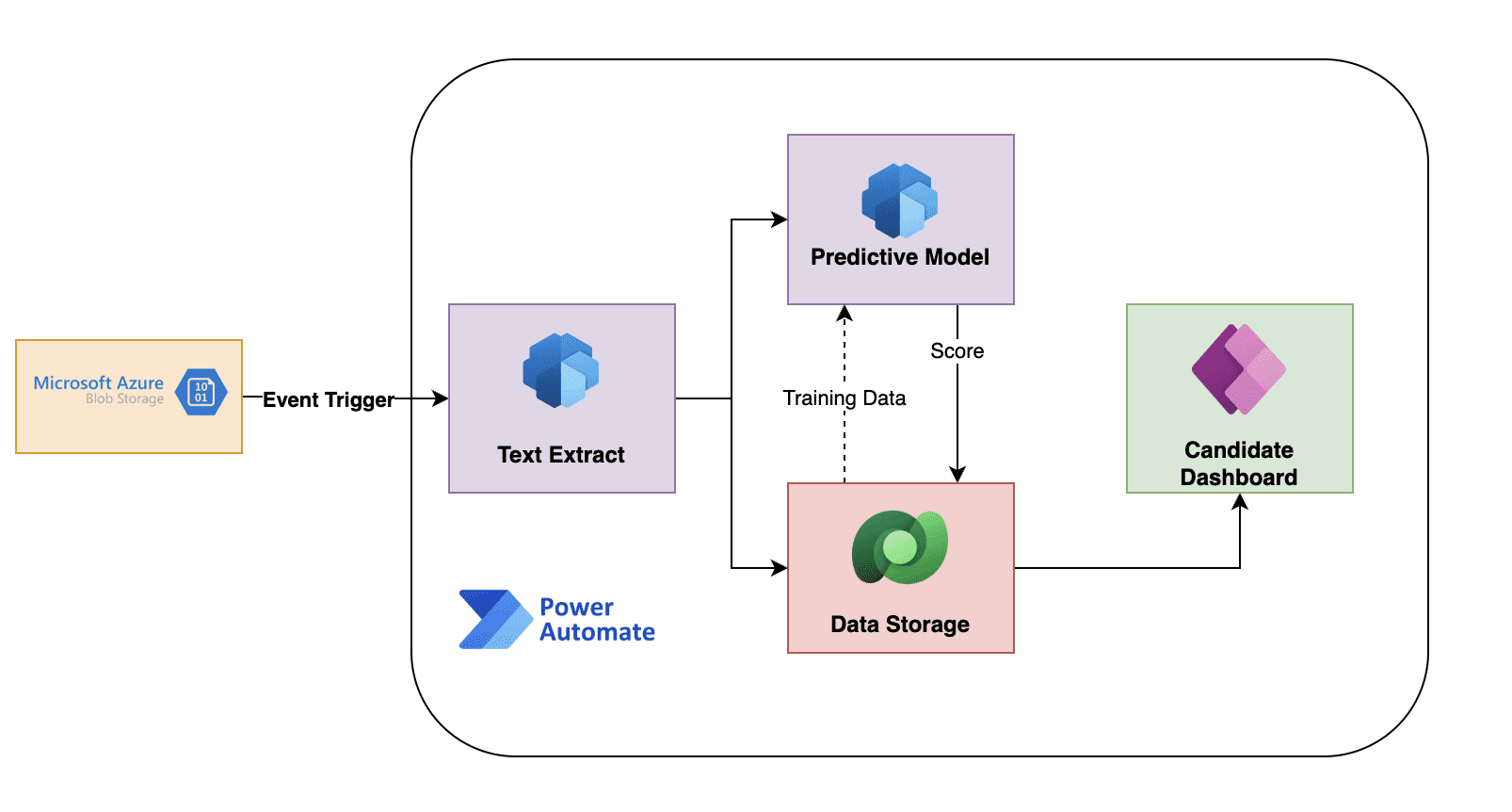
Let’s take the example of using AI to influence hiring decisions and do a high-level walk-through of how that could be implemented using one of these low-code tools. What we want to do is review resumes that have been submitted for a position and score them based on past candidates’ resumes.
Ultimately, this will provide us with a dashboard of candidates best suited for the job, based on their resumes. This can be achieved in several ways; for this example, we’ll use Azure AI Builder in conjunction with Power Automate.
Let’s start with the assumption that resumes are submitted to your website and then are loaded into a folder by job title in Azure Blob Storage. We also assume that we have historical data from the workflow previously that is saved in Dataverse
Create an event trigger in Power Automate to kick off the flow when a new file is added to the blob
Extract the data from the document using AI Builder
This could be done using pre-built connectors or a custom one
Full text can be extracted along with structured fields (name, address, etc) and configurable skills keywords
No code is required here, and model re-training can be done in the UI
Run a predictive model in AI Builder based on historical data
Power Automate kicks off the AI Builder model
Training data for the model is based on past candidates using features such as:
Skills
Experience
Education
Hired/not hired label
Tenure
The model outputs a hireability score
Store results in Dataverse
Candidate info, scores, and other data, such as about the open job recs, are stored in Dataverse
This could be a number of data platforms, but is used here for ease of implementation with Power Automate and other Azure services, such as Power BI
Create Power Apps Review Dashboard
A dashboard to be built to allow reviewers to:
View top candidates
Click into their resumes
Add human evaluation notes
Override scores with a justification
This is one of the most basic examples, but as you can see, beginning to work with AI for your HR data can be accomplished with just a few steps. However, every company is different, and scaling this can begin to pose problems without the proper knowledge base. What if your candidate data is all in Workday or in several different systems that require an API to get it into your low-code solution? What are the best practices to retrain the models? Am I getting accurate results?
These are questions that will inevitably arise, and many organizations are opting to have a machine learning engineer by their side to ensure their AI processes are running optimally and producing the desired results.
Closing
AI is no longer the future of PeopleOps and HR, it’s the new standard, helping teams automate repetitive tasks, personalize learning, and act on engagement trends to improve satisfaction and hiring outcomes; as technologies like Snowflake, Azure, and AWS evolve, now is the ideal time to start integrating AI into your HR decision-making.

Want to see what AI can really do for your HR team?
We’ll help you zero in on the right use cases and bring them to life with tools like Snowflake, Azure, and AWS.