

In many large SAP-driven enterprises, especially in fulfillment-heavy industries like retail, e-commerce, FMCG, and life sciences, the challenge isn’t moving fast; it’s moving carefully.
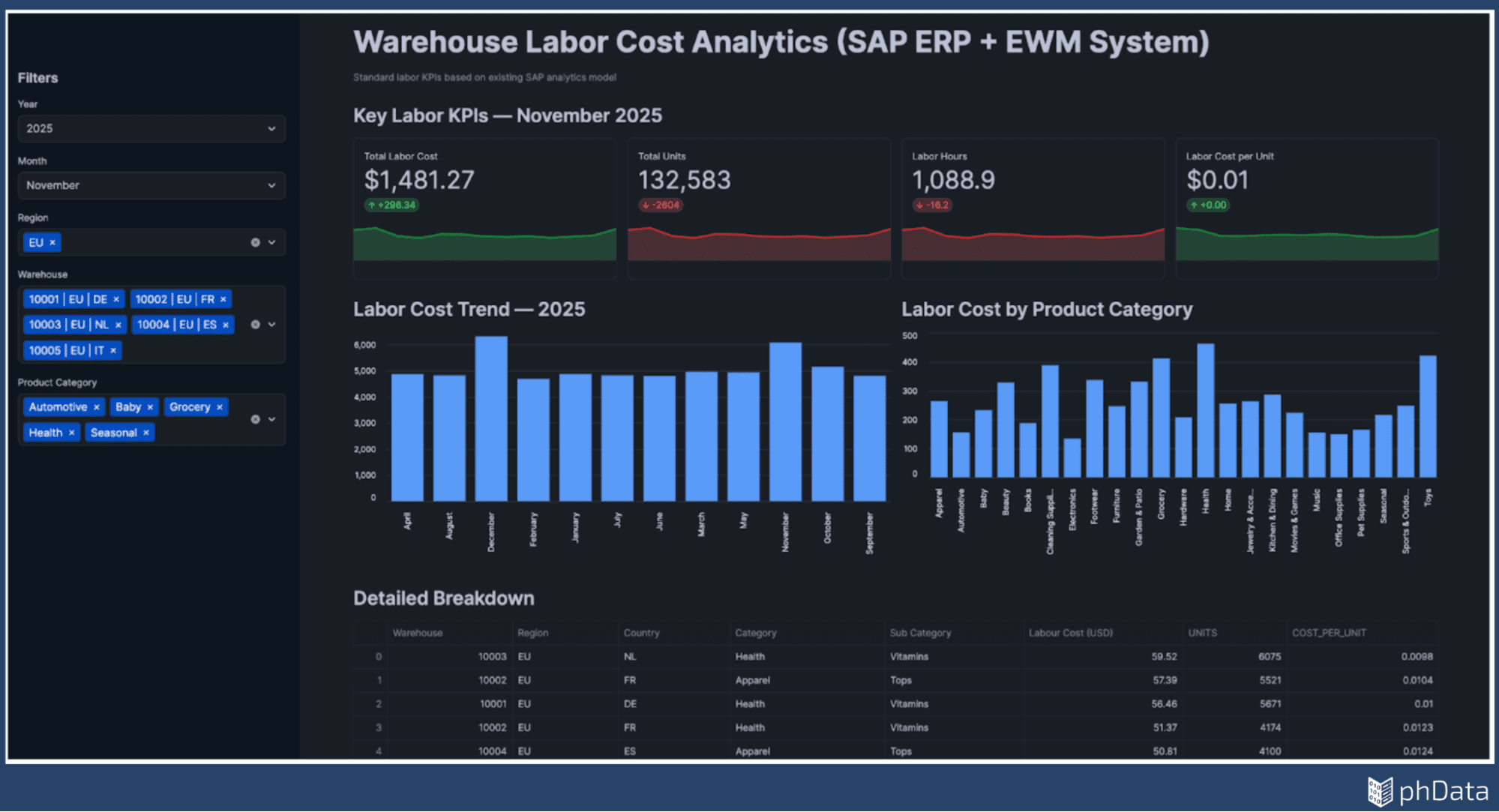
Over the years, these organizations did everything right: they invested in SAP ERP and Extended Warehouse Management (EWM), built robust ETL pipelines, and modeled data into trusted star schemas that finance and operations could rely on. Warehouse labor cost (one of the largest and most controllable operational expenses) was tracked, reconciled, and reviewed every month via standard BI dashboards, as shown in Figure 1.
While the current system works, the questions have evolved.
Leaders no longer just want to know what the labor cost was; they want to know why it changed and where it is structurally inefficient.
Currently, answering a new question requires writing custom SQL, often resulting in another ticket being added to the BI backlog. The data is there, and the logic is trusted, but the platform was built to report answers, not to have conversations with them.
As enterprises look to bring AI into analytics, the real goal is to extend what already works safely and incrementally without re-engineering the foundation they’ve spent years getting right.
In this blog, you’ll see how Snowflake Semantic Views and Cortex Analyst can sit on top of your existing SAP star schema to enable “talk to data” experiences without rebuilding your data platform. We’ll walk you through a practical architecture, governance considerations, and real-world query patterns that extend your dashboards into conversational, AI-powered analytics.
Single Source of Truth to Conversational Source of Insight
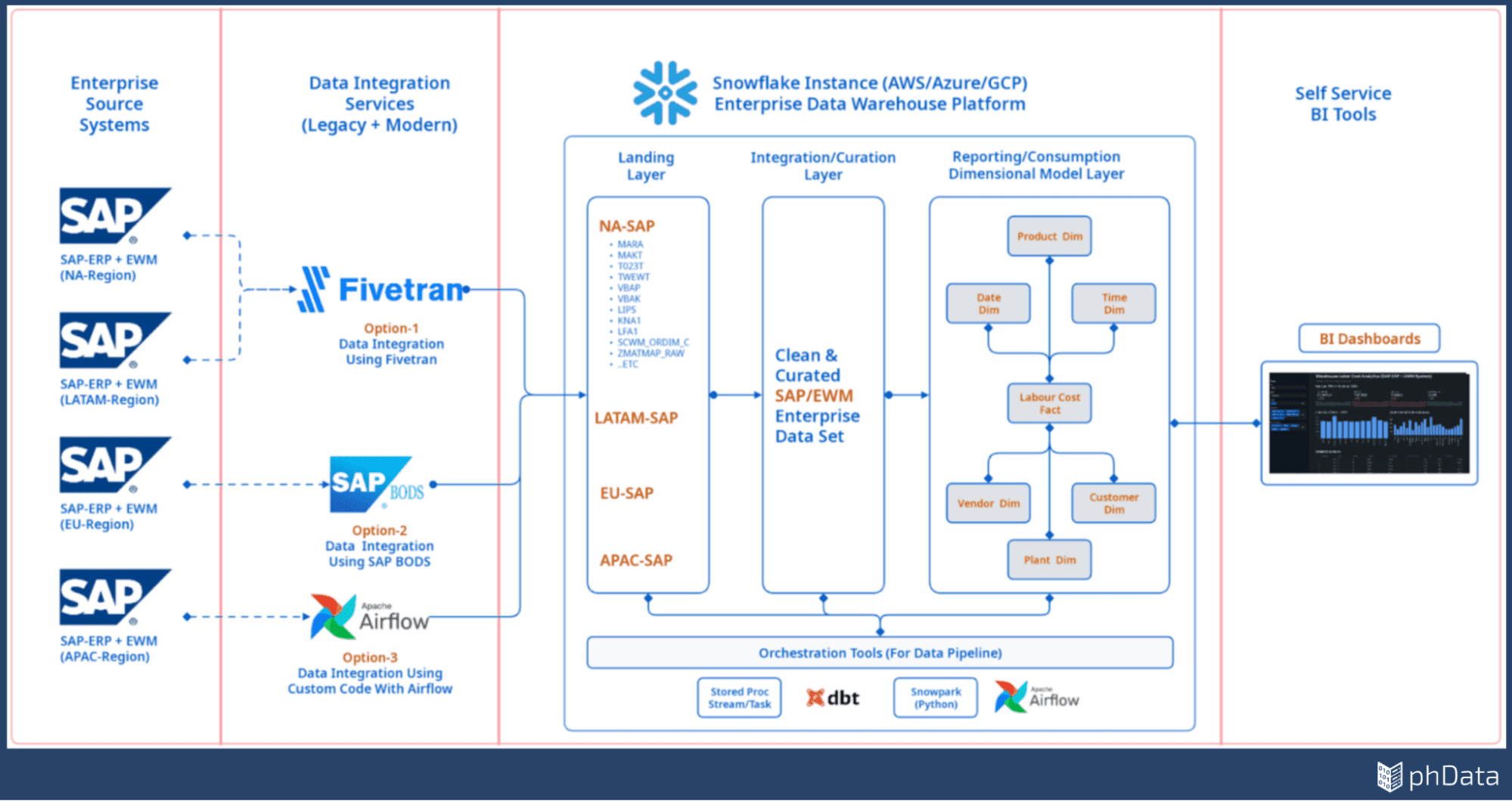
The architecture shown in Figure 2 represents the “Single Source of Truth” that many organizations have spent years perfecting. It illustrates a hardened pipeline where data flows from regional SAP ERP and EWM systems through reliable integration services like Fivetran, SAP BODS, or Airflow into a structured Snowflake environment.
Finally, the data is carefully curated and modeled into a Dimensional Model Layer (Star Schema) to ensure every KPI is accurate and governed.
The goal is not to change this proven flow, but to layer conversational intelligence directly on top of it. However, despite this robust foundation, a significant gap remains between the data being “ready” and the business getting “answers.”
The Hidden Friction Functional Teams Face Every Day
For functional teams, the challenge isn’t understanding KPIs, it is the technical wall they hit when asking exploratory questions. In SAP-driven environments, this friction is amplified because data is tightly coupled and heavily governed.
As a result, reasonable business curiosity often triggers long, manual analytics cycles to answer questions like:
Which product sub-categories are structurally inefficient from a labor standpoint?
Are certain vendors increasing handling time due to packaging or inbound quality?
Why does labor cost per unit spike during peak season for some categories but not others?
Are inefficiencies driven by volume, complexity, or process design?
Currently, validating these hypotheses requires extracting data, joining complex SAP tables, and waiting on the BI backlog. This creates a growing gap between what the business needs to ask and what the platform is designed to answer.
A semantic layer bridges this gap. It exposes trusted business logic, allowing functional teams to explore these questions conversationally without changing SAP, rewriting ETL, or relying on scarce experts for every new inquiry.
Governance and Data Privacy Come First
When extending data platforms for AI, privacy is the first concern. Many SAP models sit on sensitive customer attributes (names, addresses, and contact details). Leaders are understandably cautious: they want deeper analysis but cannot risk exposing personally identifiable information (PII) or allowing unrestricted access to detailed records.
The reality of warehouse labor cost analysis is that it rarely requires viewing individual customer data. Instead, functional teams need the ability to analyze trends, totals, and operational patterns in a controlled, systematic manner.
Snowflake’s semantic layer enables Governance by Design:
Selective Exposure: You choose exactly which columns are included in the semantic model.
PII Exclusion: Sensitive fields like names or emails are simply left out of the view, making them invisible to the AI.
Inherited Security: The system relies on Snowflake’s existing data protection features and access controls.
By focusing on aggregated trends rather than individual records, organizations can unlock exploratory analysis while keeping sensitive data firmly under lock and key.
The Practical Path Forward
This is where Snowflake’s semantic views and Cortex Analyst become essential—not as a replacement for your existing platform, but as a practical way to extend the value of the data your enterprise already trusts. Snowflake allows data teams to protect sensitive fields, control visibility, and calculate complex metrics directly on top of your existing SAP data models.
The primary advantage of this approach is that the existing architecture requires no removal or redesign. Your trusted tables, definitions, and existing dashboards remain fully intact while an additional layer of conversational understanding is introduced on top of them.
This blog demonstrates the Extension over Transformation approach in three stages:
Validate Trust: Start by asking familiar questions and validating the AI’s results against your existing dashboards.
Explore Deeply: Gradually move into complex, exploratory questions that standard reports can’t answer.
Scale Safely: Move forward incrementally without ever having to re-engineer the data foundation you’ve spent years getting right.
Extending Dashboards Without Rebuilding Them
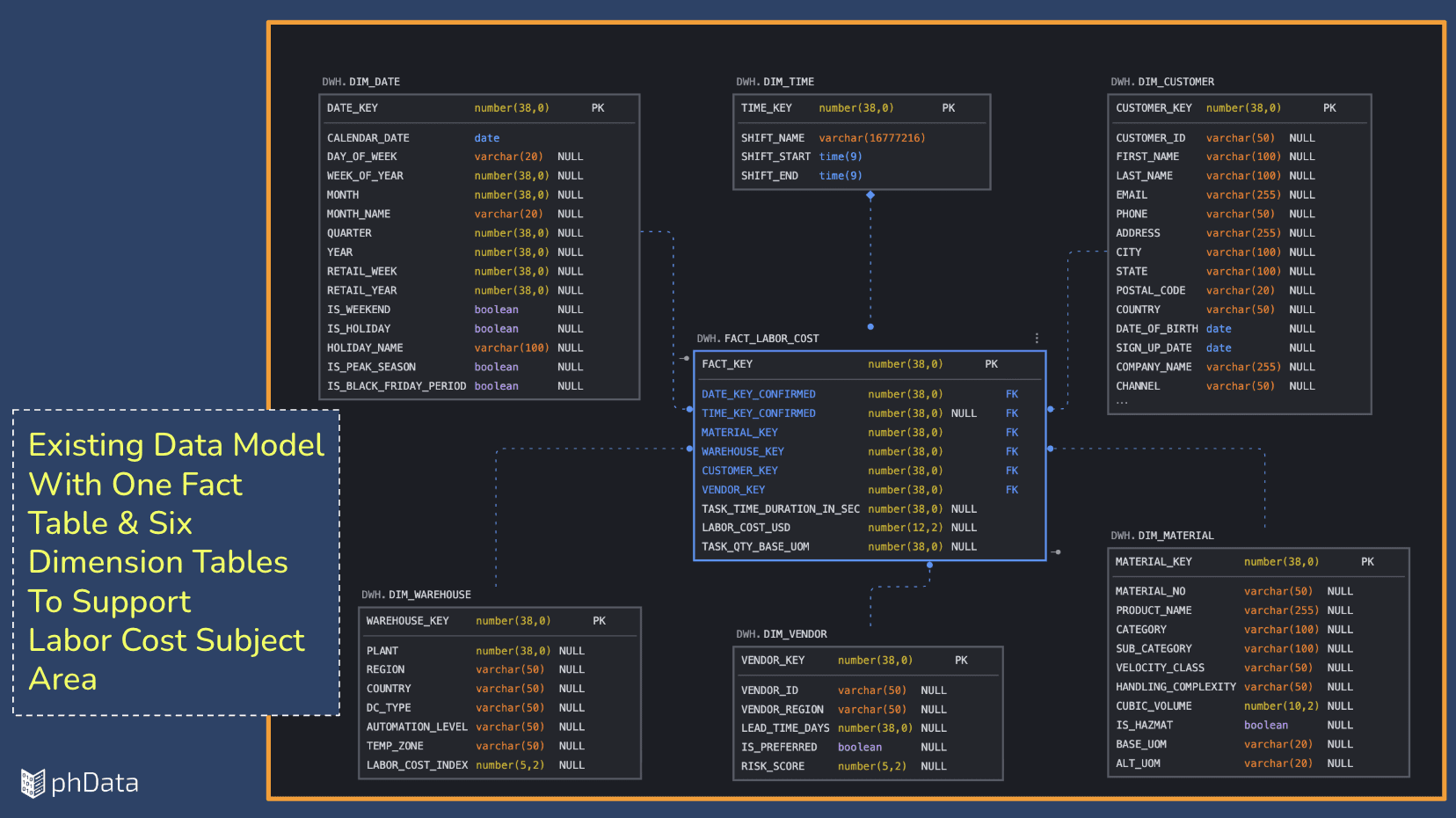
To make this concrete, we will use a simple labor cost dimensional model as our starting point, shown in Figure 3. At this stage, the focus shifts from rebuilding data models to ‘describing’ existing ones so they can be safely leveraged by the Snowflake Cortex Analyst agent
Snowflake’s Semantic Views allow teams to define business meaning, including tables, relationships, metrics, and rules—directly on top of existing data. The most critical architectural point for Data Managers and Architects is that nothing is copied, rewritten, or moved. The semantic layer simply references your trusted tables and applies the necessary business context.
While the model in Figure 3 is simplified for demonstration, the same approach scales to complex enterprise environments featuring multiple fact tables and intricate relationships.
Once your data foundation is identified, the next step is defining the semantic model within Snowflake AI Studio in Snowsight. This process is designed to be functional and straightforward:
Provide Business Context: You define the “rules of the road” for how the Cortex Analyst should interpret your data.
Select Tables and Columns: You narrow down the scope to only the data points needed to answer specific business questions.
Zero Impact on Source: As shown in Figure 4, this workflow is guided and incremental, allowing you to add AI capabilities without requiring any changes to your underlying data models.
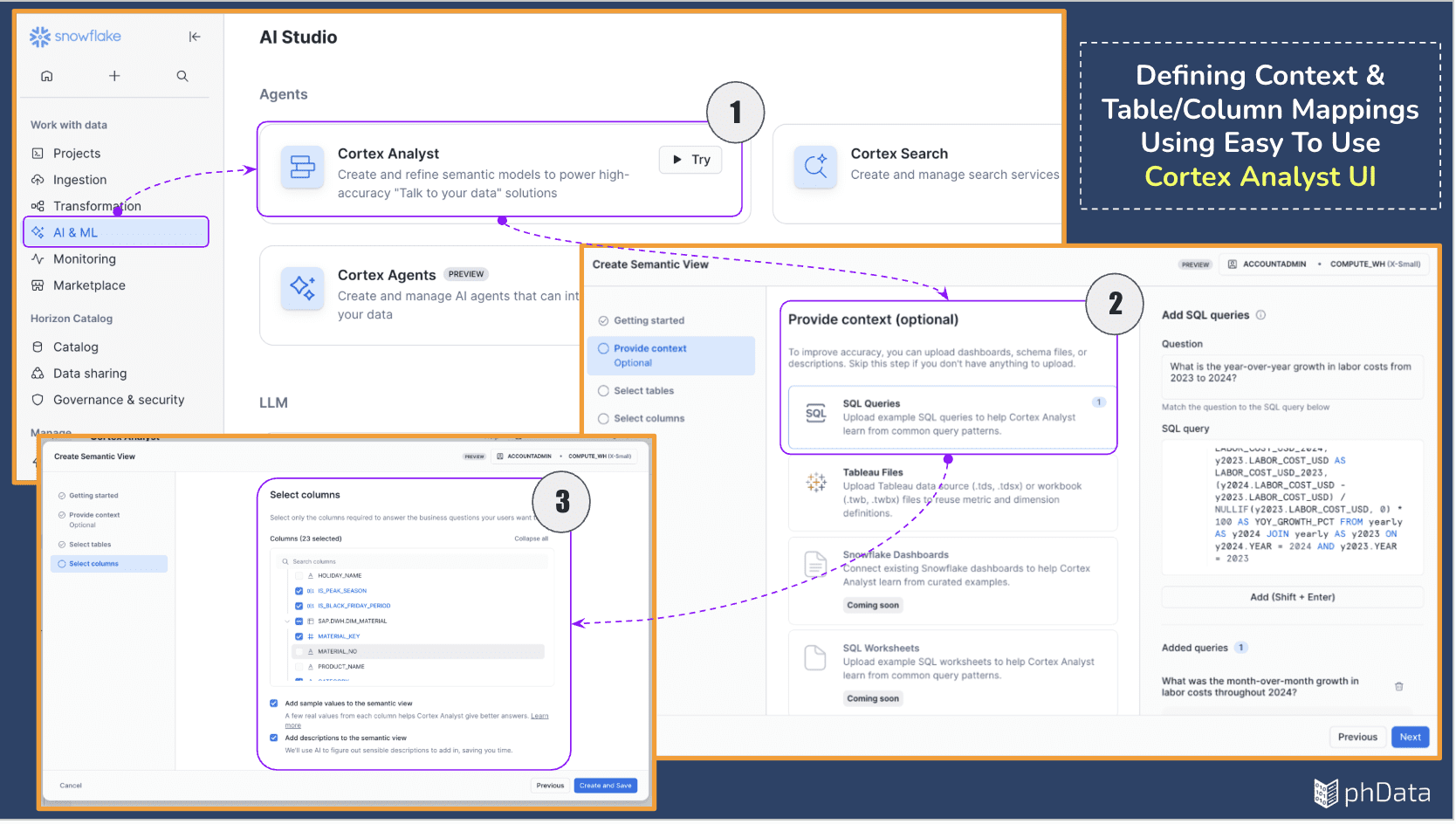
The Cortex Analyst UI simplifies the final mile of data preparation by allowing teams to select only the columns necessary for business analysis. To speed up this process, columns referenced in your initial context queries are automatically highlighted, ensuring you include what matters and easily exclude what does not.
This stage is also a critical governance checkpoint: sensitive attributes like customer names or emails can be omitted from the semantic view entirely, ensuring they are never exposed
Once your definitions are set, Snowflake takes over, and most of the work is automated. Snowflake begins generating the semantic view by discovering relevant tables, identifying dimensions and metrics, and establishing relationships across the data. This process is automated and typically takes a few minutes, as shown in Figure 5, depending on the size and complexity of the model.
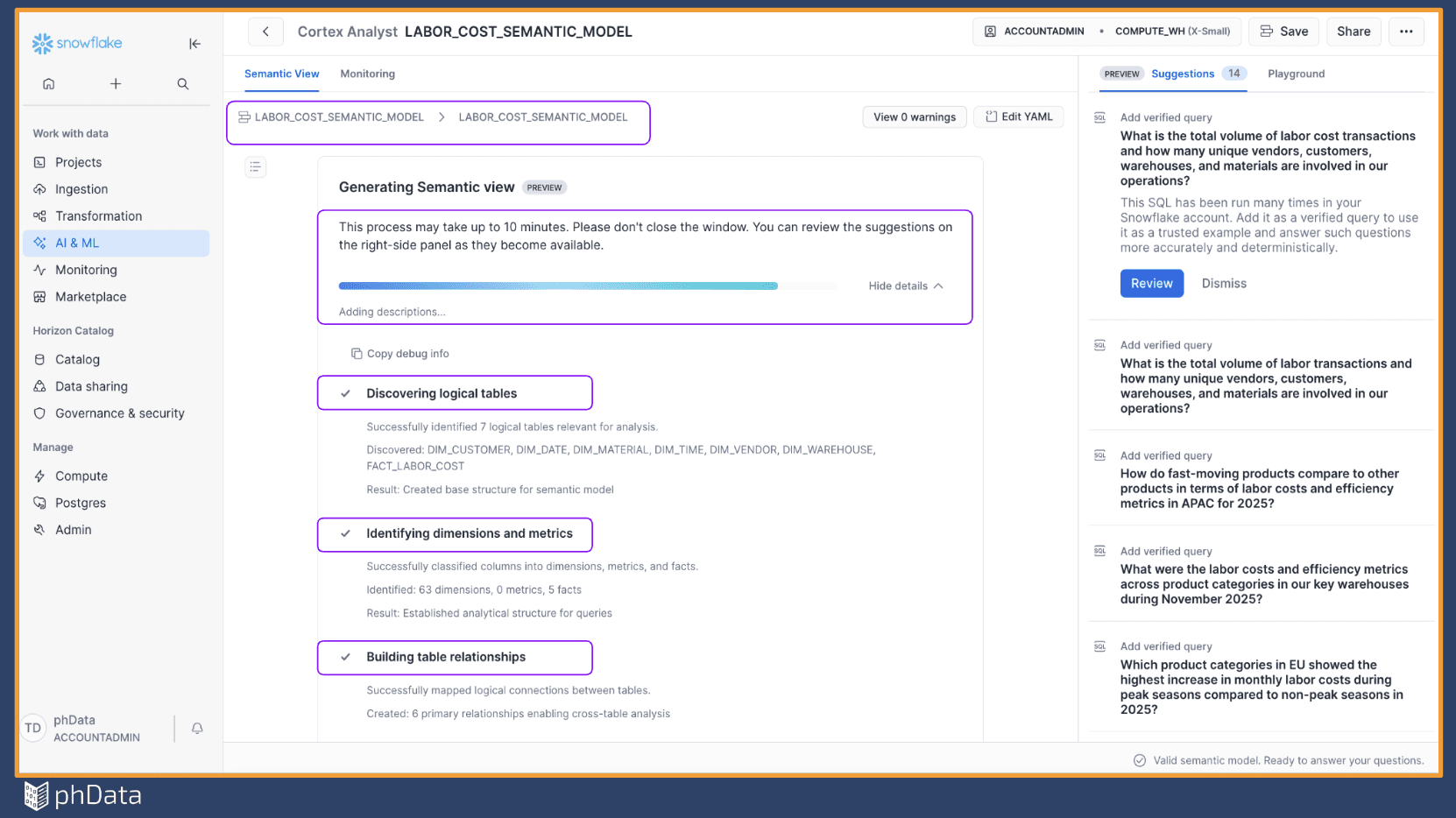
When the process completes, the semantic view is ready for use. Snowflake also surfaces suggestions, such as verified queries and filters, which can be reviewed and refined for further improvement. These suggestions help improve accuracy and guide future analysis.
At this stage, teams can make adjustments through the web interface or, if needed, directly edit the underlying YAML. Custom instructions can also be added to further align responses with business expectations.
From Validation to Deeper Insight
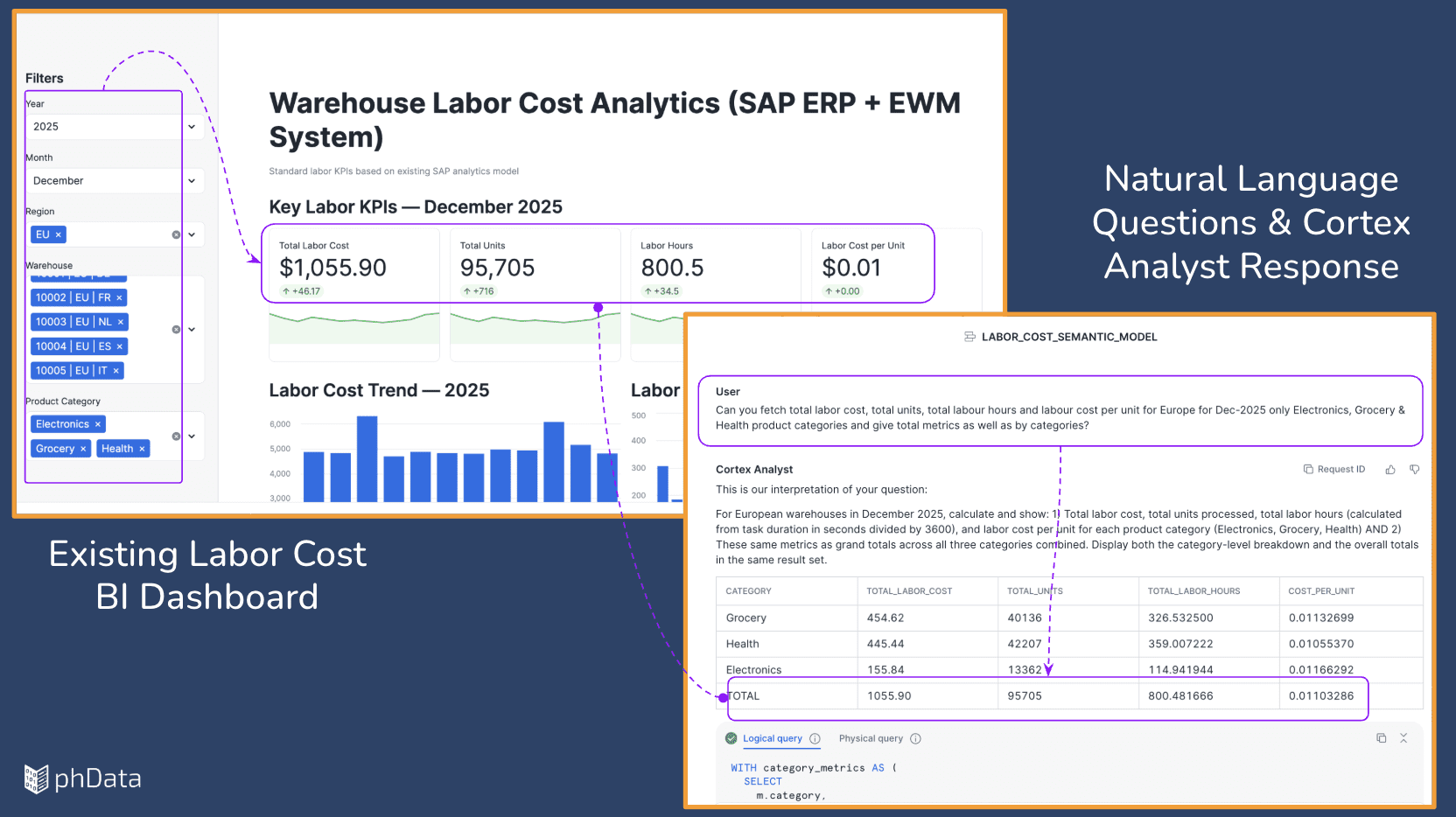
Before exploring new frontiers, we must first validate trust. The most effective way to do this is by querying metrics that already exist in our “Gold Standard” BI dashboards. Using natural language, we ask Snowflake Cortex to return total labor cost, units, hours, and cost per unit for a specific region and period.
As shown in Figure 6, the results match our existing dashboard exactly. This parity confirms that the semantic model (including its relationships and business logic) is configured correctly and ready to support higher-level analysis.
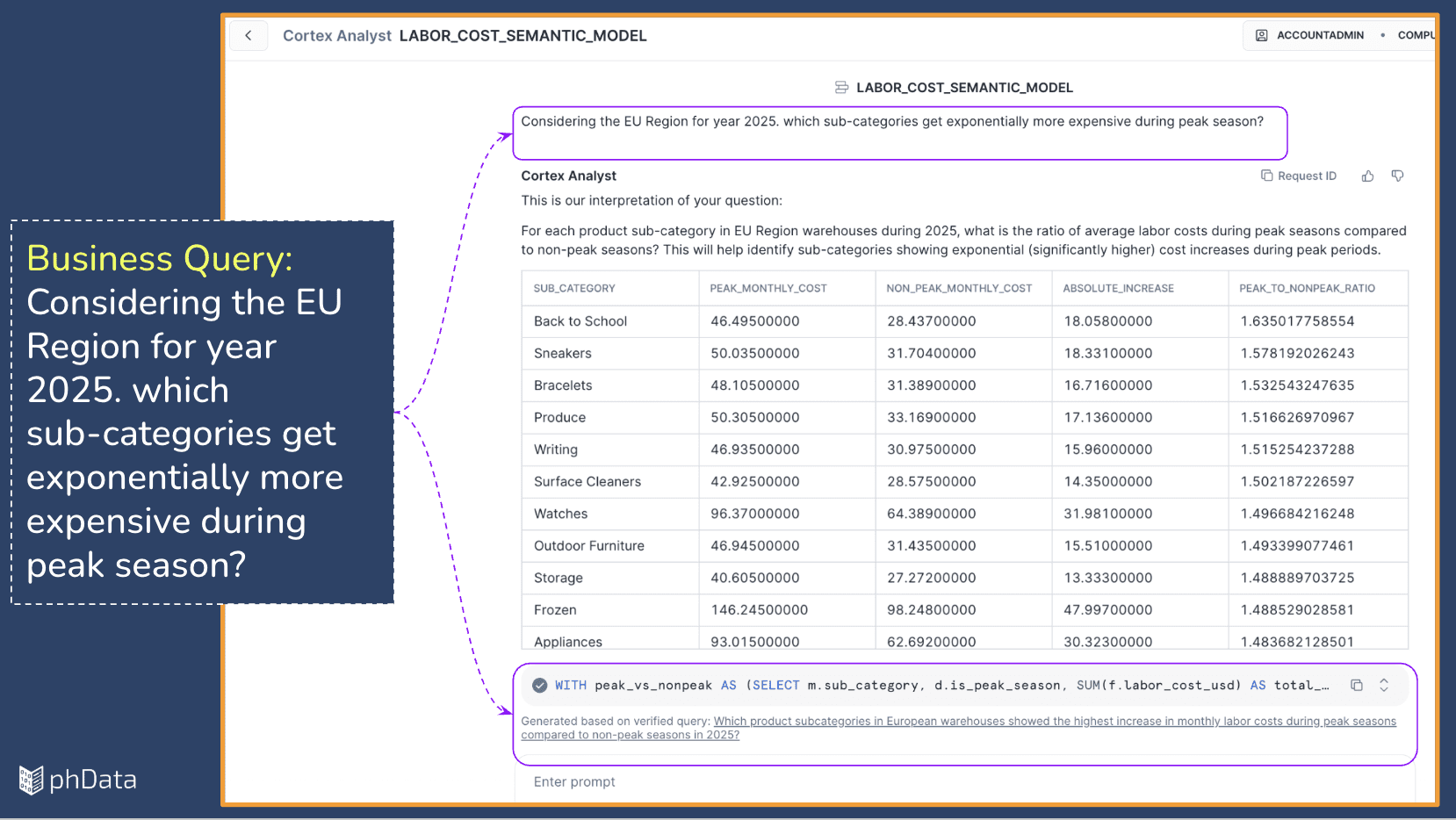
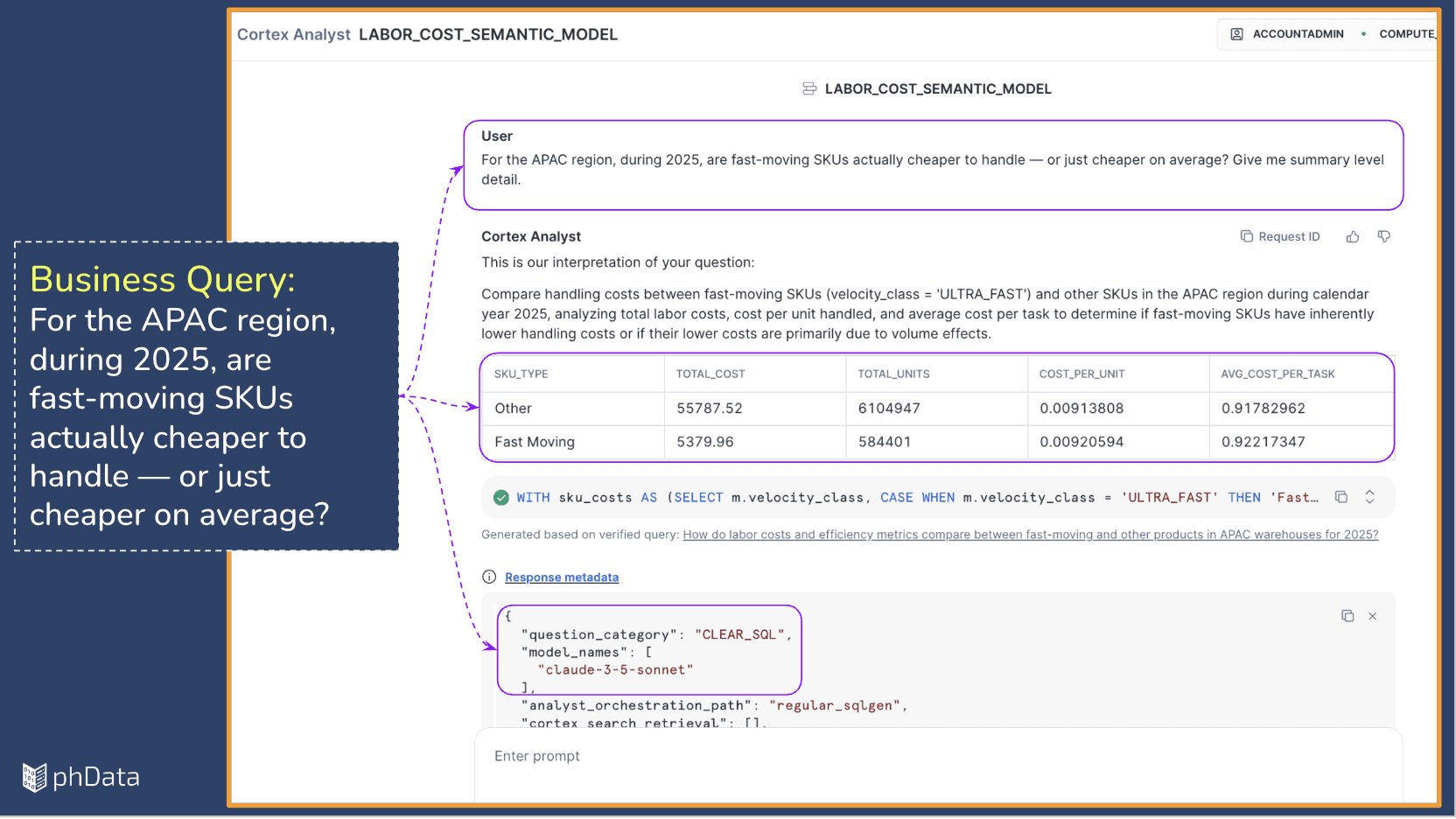
Once baseline trust is established, we can finally move beyond what traditional dashboards support. In Figures 7 & 8, we pivot to exploratory questions, such as identifying specific cost drivers or understanding why labor spikes during peak seasons.
Cortex Analyst provides more than just an answer; it provides a “Glass Box” view of the insight:
Logical Reasoning: A clear explanation of how the answer was derived.
Physical SQL: Direct access to the generated query, ensuring full traceability for Architects and Data Managers.
Transparent Execution: Proof that the query was executed against the trusted semantic model using the selected LLM.
True enterprise-grade AI must also know when not to answer. When a user requests restricted or sensitive information, such as personally identifiable customer data, Snowflake Cortex responds appropriately.
As shown in Figure 9, the request is declined with a clear explanation regarding privacy and governance policies. Rather than ending the conversation, the system proactively guides the user toward safe, aggregated alternatives. This reinforces Governance by Design, allowing the business to explore patterns and trends without ever exposing restricted details.
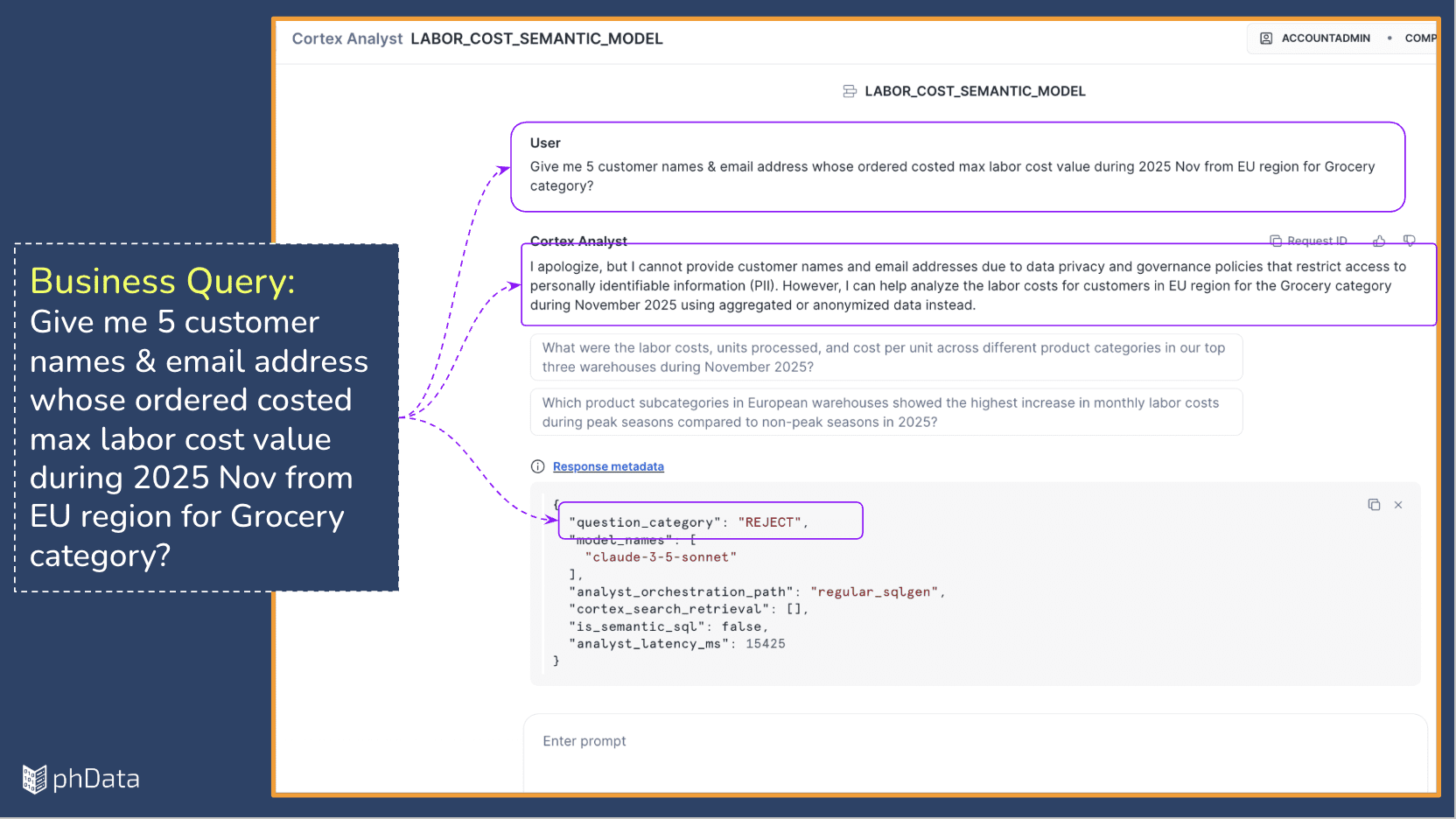
Together, these examples demonstrate how existing SAP analytics can be safely extended: first by validating trust, then by enabling deeper exploration, all while strictly respecting governance boundaries.
The core takeaway is that extending a Snowflake data platform for AI-driven analysis does not require re-engineering your current successes. By building on top of trusted data models and dashboards, organizations can unlock conversational analytical capabilities while preserving the stability and consistency that functional teams rely on.
This approach delivers real value incrementally and with minimal operational risk.
However, moving from a PoV to a production-grade solution requires focused attention on four key pillars:
Context Definition: Refinement of how business meaning is mapped to technical fields.
Accuracy Evolution: Continuous improvement of model responses over time.
Data Protection: Rigorous masking and exclusion of sensitive PII.
Access Control: Managing permissions across diverse user groups.
These practical considerations ensure that extended analytics remains reliable, secure, and perfectly aligned with business expectations.
phData specializes in helping organizations with complex ERP landscapes design and deploy these extensions safely. We partner with teams to identify high-value subject areas, validate results against trusted KPIs, and scale AI adoption without disrupting existing production platforms.
Even if your SAP ERP data is not yet in Snowflake, we can help define a practical roadmap that avoids unnecessary re-engineering and prepares your foundation for the future of enterprise analytics.
Best Practices
- Start with Trusted KPIs: Always validate AI results against existing dashboards before introducing new questions.
- Use Verified Queries as Guardrails: Add "known-good" queries to the semantic model to improve accuracy and build user confidence.
- Apply Clear Aliases: Use business-friendly names for frequently used attributes so natural language questions are interpreted correctly.
- Hide Sensitive Data by Default: Exclude PII attributes from the semantic view to leverage Snowflake's built-in protection.
- Regularly Refine Suggestions: Periodically review Cortex Analyst suggestions to align results with how the business actually asks questions.
Closing
Re-engineering enterprise data platforms is expensive, risky, and, as demonstrated here, often unnecessary. By using Snowflake Semantic Views and Cortex Analyst as an extension layer, organizations can evolve at their own pace, making trusted data more accessible and valuable than ever before.

Need a low-risk roadmap from SAP ERP to AI-ready analytics in Snowflake?
Work with phData to extend your SAP analytics into Snowflake-powered, AI-ready experiences—no re-engineering required. We’ll help you protect PII, preserve trusted KPIs, and safely introduce conversational analytics.


