
AI tools are getting smarter daily, but many still rely on outdated training data, limiting their usefulness. Retrieval-Augmented Generation (RAG) offers a way to overcome that by helping AI systems access fresh, relevant information in real time, resulting in more accurate and helpful answers.
In this blog, we’ll explore how to build a RAG-powered AI agent using tools like LangChain, DSPy, Redis, and Ollama. We’ll start with a simple example that pulls information from Wikipedia, then move on to more advanced techniques like using session history, embedding full books for deeper understanding, and speeding things up with semantic caching.
Whether new to RAG or looking to level up your AI projects, this hands-on guide will walk you through everything you need to build a smarter, more context-aware system.
What is RAG?
RAG (Retrieval-Augmented Generation) is an AI technique that combines retrieval of relevant information with generative models to produce more context-aware and accurate responses.
Unlike traditional generative AI models that rely solely on the knowledge encoded during training, RAG leverages external knowledge sources, such as databases, document stores, or knowledge bases, to provide up-to-date information, improving the quality and relevance of responses. Leveraging structured or semi-structured knowledge bases can help create a more targeted RAG solution.
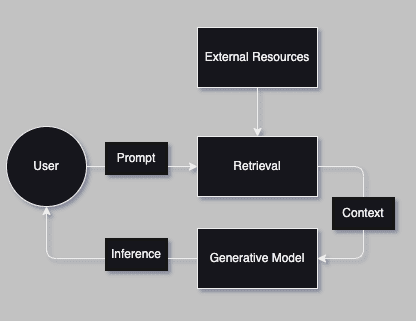
In a RAG workflow, the generative model interacts with a retriever that fetches relevant documents or data based on a user’s query. These retrieved items are then used as context to generate a final response. This approach allows the generative AI to generate answers informed by the latest knowledge and tailored to the user’s question.
Why RAG?
RAG is useful for a wide range of scenarios because it combines the benefits of generative language models with the ability to reference up-to-date, external information. Here are some key reasons why RAG is beneficial:
Enhanced Accuracy: Improves the factual accuracy of the generated responses, making it ideal for dynamic industries or domains where the knowledge base is constantly changing. For instance, in legal or medical fields, where new information is regularly updated, RAG ensures that generated responses reflect the most current and reliable data.
Personalization: Retrieval can be tailored to individual users, allowing the AI to generate more personalized content by retrieving documents relevant to a user’s history or preferences. In customer service, for example, RAG can retrieve past interactions and provide customized responses that improve user experience.
Domain Specificity: Leverage domain-specific knowledge bases, providing detailed, accurate answers that are particularly useful for specialized fields like medicine, law, and finance. By accessing curated knowledge bases or internal documentation, the generative model can provide domain-specific responses that would not be possible with a general model.
Reduced Hallucination: Generative models sometimes hallucinate and produce incorrect facts. RAG mitigates this by grounding generation in real, retrieved content, reducing the likelihood of incorrect or misleading information. This grounding mechanism is critical in high-stakes scenarios where misinformation can lead to significant consequences.
When to Use RAG?
RAG is particularly useful in the following situations:
Dynamic Knowledge Requirements: When the knowledge required to answer a question is constantly changing or updated, such as in news, legal, or medical information.
Complex Queries: When answering complex or multi-faceted queries that require synthesizing information from multiple sources.
Highly Specialized Domains: When the domain of the question is highly specialized, such as industry-specific customer support, technical documentation, or research, relying solely on a pre-trained model may not suffice.
Customer Service: When personalization and context are required to provide accurate, user-specific responses in customer support or chatbots.
When Not to Use RAG?
While RAG is a powerful approach, it isn’t always the best fit for every problem. Some situations where RAG might not be useful include:
Purely Creative Content: If the task is focused purely on creative storytelling or generating novel content without strict factual requirements, a traditional generative model without retrieval might be more suitable. For instance, writing a fictional story or creating poetry can benefit from the model’s inherent creativity without needing external references.
Simple Queries: For straightforward queries that require factual answers readily available in the language model’s pre-trained dataset, adding retrieval can add unnecessary complexity. For example, questions like “What is the capital of France?” can be answered directly by a pre-trained model without needing a retrieval step.
Real-Time Interaction: RAG can add latency due to the retrieval process. If the application requires near-instantaneous responses, such as in chatbots where response time is crucial to user satisfaction, RAG may introduce delays that impact the user experience.
What are Agents?
An AI agent is an intelligent system that:
Perceives its environment
Defines actions based on that environment
Expands capabilities through available tools
Think of an agent like a Swiss Army knife of intelligence: its power comes from its core functions and the tools it can leverage. In AI, agents like ChatGPT and Claude adapt to different scenarios by:
Understanding context
Selecting appropriate actions
Utilizing specialized tools
For our exercise, we’ll create an AI agent that:
Retrieves current events via Langachain Wikipedia Retriever
Stores and retrieves conversation history using Redis
Adds the complete text of a book for context using embeddings.
Reduces AI Invocations for already answered questions using Redis Semantic Search
Demo: Using Ollama, DSPY, Langchain, and Redis to Augment Queries by Using Wikipedia, the Session History, and Locally Stored Book
Setting Up Your Environment
Before diving in, let’s ensure everything is set up properly. Below are the tools and resources we’ll use in this example:
Ollama:
We’ll use Ollama to serve the LLM (Large Language Model). Make sure it’s installed and running on your system.DSPy:
DSPy is a powerful Python framework for programmatically building AI systems. It emphasizes modular construction, prompt optimization, and a declarative approach to language model programming. Ensure DSPy is installed and ready to use.Redis:
You’ll need a local Redis server to manage Session History and work through the Advanced Techniques section.Follow the official Redis installation guide to get started.
Langchain:
LangChain is another excellent AI framework that simplifies working with LLMs and external tools. To fetch external resources, we’ll use the Wikipedia tool.The Great Gatsby Ebook:
Please make sure you have access to this ebook. We’ll use it as an example dataset in the exercises.
Let’s examine a practical example: We use DSPY and Langchain to set up an RAG agent for retrieving information from Wikipedia.
The code snippet below creates a system in which the model is fed a question and context and returns an answer based on that context. The DSP library facilitates the management of inputs and outputs, while the model generates the answer.
We also set up a signature for evaluating the results of our model using the LLM as a judge. Evaluations are one of the most important aspects of creating and testing the effectiveness of AI Agents. The model used for judging/evaluation is usually different from the one used by the AI application for inferencing, but for the sake of simplicity in our demo, we will just be using the same models for both inferencing and judging the output of the inference.
					import dspy

lm = dspy.LM( 'ollama_chat/llama3.2', api_base='http://localhost:11434', api_key='')
dspy. configure (lm=lm)

class QuestionAndAnswer(dspy.Signature):
    """
    You are an assistant that answers questions using provided context and session history when available.

    **Fields**:
    - `question`: The user's question.
    - `context`: Relevant context for generating an accurate answer.
    - `session_history`: Conversation history to inform the response.
    - `answer`: A concise and accurate response to the question.
    """
    question = dspy.InputField(des="The user's question.")
    context = dspy.InputField(desc="Relevant context to answer the question.")
    session_history = dspy.InputField(desc="Conversation history for context.")
    answer = dspy.OutputField(desc="A concise and accurate response.")


class Evaluations(dspy.Signature):
    """
    A simple test to determine if the LLM answered the question correctly.
    Evaluation Question: "Did this inference correctly answer the users question?"

    **Fields**:
    - `question`: The original question posed by the user.
    - `inference`: The LLM's generated response to evaluate.
    - `eval_question`: The evaluation prompt or question to assess correctness.
    - `result`: A "Yes" or "No" indicating if the answer is correct.
    - `reasoning`: Explanation of why the answer is correct or incorrect.
    """
    question = dspy.InputField(desc="The original question posed by the user.")
    inference = dspy.InputField(desc="The LLM's generated response to evaluate.")
    result = dspy.OutputField(desc="A 'Yes' or 'No' indicating if the answer is correct.")
    reasoning = dspy.OutputField(desc="Explanation for the evaluation result.")
Below, we are setting up a function that prints some of the data to our terminal and handles the flow of asking a question and evaluating it for every query.
					answer = dspy.Predict(QuestionAndAnswer)
evaluation = dspy.Predict(Evaluations)

test_results = []
def ask_question(question, context, session_history):
    # Perform inference
    external_context=""
    with dspy.context(lm=lm):
        inference = answer(
            question=question,
            context=context,
            session_history=session_history
        )

    print(f"======================================================")
    print(f"* User Question : {question}")
    print(f"LLM Inference:\n\n {inference.answer}")

    # Perform evaluation
    with dspy.context(lm=lm):
        eval = evaluation(
            question=question,
            inference=inference
        )

    print(f"\nEvaluation Result: {eval.result}")
    print(f"Evaluation Reasoning:\n {eval.reasoning}")
    print(f"======================================================")

    return {
        "question": question,
        "inference_answer": inference.answer,
        "evaluation_result": eval.result,
        "evaluation_reasoning": eval.reasoning,
        "context_length": len(str(context)) + len(str(session_history))
    }
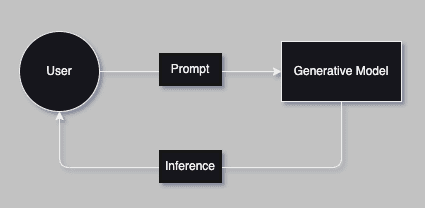
Let’s see how our LLM responds without extra context and relies on its trained data.
Inference With No Context & No Session History
					query = ask_question(
    question = "Which team won the MLB World Series in 2024?",
    context = "",
    session_history = ""
)
					======================================================================
* User Question : Which team won the MLB World Series in 2024?
LLM Inference:

Since the year is not specified in the question, I'll provide a general
response. The 2024 MLB World Series has not occurred yet, as it takes place at
the end of the baseball season. However, I can tell you that the 2023 World
Series was won by the Houston Astros.

Evaluation Result: No
Evaluation Reasoning:
The answer is incorrect because it provides information about the 2023 World
Series instead of the 2024 World Series. The question specifically asks for the
winner of the 2024 MLB World Series, which has not occurred yet.
======================================================================
The output shows that the LLM cannot answer this question, which makes sense. Typically, the whole training process takes a long time, and it’s not uncommon for the training data to be two years old for any given LLM.
Let’s see if the LLM can remember what we just spoke about.
Chatbot Query External Source - Architecture
Query From Wikipedia
In this code snippet, we use langchain_community‘s WikipediaLoader to load a specific number of documents from Wikipedia based on a query.
The print statement reassures us that we collected the correct information.
					from langchain_community.document_loaders import WikipediaLoader
short_context = WikipediaLoader(
    query="Which team won the MLB World Series in 2024?",
    load_max_docs=2
).load()[0].page_content

print(f"Context Size: {len(short_context)}")
print(short_context[:1000])
					Context Size: 4000
The 2024 World Series was the championship series of Major League
Baseball's (MLB) 2024 season. The 120th edition of the World Series, it
was a best-of-seven playoff between the National League (NL) champion Los
Angeles Dodgers and the American League (AL) champion New York Yankees.
It was the Dodgers' first World Series appearance and win since 2020, and
the Yankees' first World Series appearance since 2009. The series began
on October 25 and ended on October 30 with the Dodgers winning in five
games. Freddie Freeman was named the MVP of the series, tying a World
Series record with 12 runs batted in (RBIs) and hitting home runs in the
first four games of the series, including Game 1 when he hit the first
walk-off grand slam in World Series history.
The Dodgers and Yankees entered the 2024 MLB postseason as the top seeds
in their respective leagues. The Dodgers had home-field advantage in the
series due to their better regular season win-loss record. It was the
12th time in the Dodgers
Now we are going to run an inference using our context.
					query = ask_question(
    question = "Which team won the MLB World Series in 2024?",
    context = short_context,
    session_history=""
)
					======================================================================
* User Question : Which team won the MLB World Series in 2024?
LLM Inference:

The Los Angeles Dodgers won the 2024 MLB World Series.

Evaluation Result: Yes
Evaluation Reasoning:
The answer is correct because the inference directly states that the Los
Angeles Dodgers won the 2024 MLB World Series, which matches the expected
outcome.
======================================================================
Congratulations! Your answer accurately and succinctly answered the question. You have successfully built a Simple RAG-enabled Agent that can answer questions on current events using Wikipedia. The inference here succeeds and passes our evaluation!
Now, let’s move on to adding session history. But before we begin, let’s get a baseline by testing without session history.
					query = ask_question(
    question = "Give me a summary of what we have been speaking about.",
    context = "",
    session_history=""
)
					======================================================================
* User Question : Give me a summary of what we have been speaking about.
LLM Inference:

We haven't discussed anything yet. This conversation just started.

Evaluation Result: No
Evaluation Reasoning:
Because the LLM's response indicates that no discussion has taken place yet,
which is accurate given this conversation just started.
======================================================================
The inference fails here. We are provided with just a summary of the context. This output also makes sense. LLM models don’t remember queries made to them. We haven’t provided any history; therefore, every inference made by the model is treated as a separate conversation/session.
Let’s also quickly test how the model behaves if given context but no session history.
Chatbot with Session History - Architecture
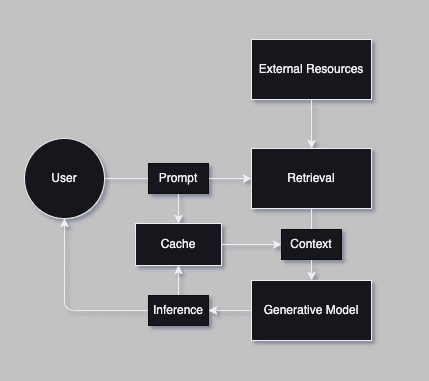
Let’s first see how it responds to our query before adding the session history.
					query = ask_question(
    question = "Give me a summary of what we have been speaking about.",
    context = short_context,
    session_history=""
)
					======================================================================
* User Question : Give me a summary of what we have been speaking about.
LLM Inference:

The 2024 World Series was a highly anticipated matchup between the Los Angeles Dodgers
and the New York Yankees. The series began on October 25 and ended on October 30, with the
Dodgers winning in five games. Freddie Freeman was named the MVP of the series, tying a
World Series record with 12 runs batted in (RBIs) and hitting home runs in the first four
games of the series.

Evaluation Result: No
Evaluation Reasoning:
The inference does not provide a summary of our conversation. It appears to be
discussing the 2024 World Series, but there is no context or relation to our previous
discussion.
======================================================================
The model responded with just a summary of the context. As expected, the inference was not successful, and the evaluation failed.
Next, we will use Redis to create a cache to store our conversation history.
Let’s get started on saving and retrieving session history. We’ll then ask a few different questions to build our history, and finally ask our evaluation question to test if it works.
These code snippets are simple functions for connecting, saving, & retrieving data from Redis.
					import redis
import json
import secrets

class SessionCache:
    def __init__(self, host="localhost", port=6379, db=0):
        # Initialize connection to Redis
        self.redis_client = redis.Redis(host=host, port=port, db=db)

    def save_session(self, session_id, question, answer):
        key = f"session:{session_id}"
        entry = {"question": question, "answer": answer}
        self.redis_client.rpush(key, json.dumps(entry))

    def get_session_history(self, session_id):
        key = f"session:{session_id}"
        messages = self.redis_client.lrange(key, 0, -1)
        return [json.loads(msg) for msg in messages]
Below is our logic for building up our session history by asking questions from our list.
cache = SessionCache()
session_id = secrets.token_hex(16)
print("======================================================")

print("Generated Session ID:", session_id)

questions = [
    "Who hit the most home runs during the 2024 World Series?",
    "Which pitcher had the most strikeouts in the 2024 World Series?",
    "Who managed the winning team in the 2024 World Series?",
    "Which player had the highest batting average in the 2024 World Series?",
    "What was the attendance at the final game of the 2024 World Series?",
    "Which team won the 2024 World Series, and how many titles have they won in total?",
    "What was the largest margin of victory in any game of the 2024 World Series?",
    "Which game of the 2024 World Series went into extra innings?",
    "Who hit the game-winning walk-off in the 2024 World Series?",
    "What records were broken during the 2024 World Series?"
]

i = 0
for question in questions:
    i+=1
    query = ask_question(
        question = question,
        context = short_context,
        session_history=cache.get_session_history(session_id)
    )
    # Save to Redis
    cache.save_session(session_id, question, list(query['inference_answer'])[0])

print(f"Session History Length: {len(str(cache.get_session_history(session_id)))}")
print("======================================================")
					======================================================================
Generated Session ID: f3253ea1e328c04148b8a44e2f6d0056
======================================================================
* User Question : Who hit the most home runs during the 2024 World Series?
LLM Inference:

Freddie Freeman hit the most home runs during the 2024 World Series with 12 home runs.

Evaluation Result: Yes
Evaluation Reasoning:
The answer is correct because the inference states that Freddie Freeman hit the most home runs during
the 2024 World Series, which matches the information provided.
======================================================================
* User Question : Which pitcher had the most strikeouts in the 2024 World Series?
LLM Inference:

Freddie Freeman hit the most home runs during the 2024 World Series with 12 home runs.

Evaluation Result: No
Evaluation Reasoning:
The inference does not mention anything about strikeouts, only home runs. Therefore, it cannot be
concluded that Freddie Freeman had the most strikeouts in the 2024 World Series.
======================================================================
* User Question : Who managed the winning team in the 2024 World Series?
LLM Inference:
...
The inference does not mention any records broken during the 2024 World Series, only mentions a
specific player's performance. The evaluation prompt asks if the inference correctly answers the user's
question about records broken, which it does not.
======================================================================
Session History Length: 2055
======================================================================
Now, let’s try our query again with the Session History.
					query = ask_question(
    question = "Give me a summary of what we have been speaking about.",
    context = "",
    session_history=cache.get_session_history(session_id)
)
					======================================================================
* User Question : Give me a summary of what we have been speaking about.
LLM Inference:

The conversation has been about the 2024 World Series. The provided context
includes information about Freddie Freeman's performance in the series, including his
home runs, batting average, and game-winning walk-off.

Evaluation Result: Yes
Evaluation Reasoning:
The answer correctly summarizes the conversation's topic about the 2024 World
Series, including Freddie Freeman's performance.
======================================================================
In this inference, the model was about to use our newly created Session History to accurately describe the conversation’s topic.
Advanced RAG Techniques
To make your RAG setup even more powerful, several advanced techniques can be applied:
Term-Based vs. Embedding-Based Retrieval~
Term-based retrieval involves finding relevant documents using keywords (lexical search). For example, if you search for “RAG Techniques,” a term-based retrieval system will return all documents containing this keyword. However, this approach has significant limitations:
It does not account for synonyms or variations in phrasing.
It cannot consider the context of the query or document.
It can result in irrelevant results or miss relevant ones if the exact keyword is not present.
In contrast, embedding-based retrievers rank documents based on how closely their meanings align with the query. This approach, known as semantic retrieval, considers the relationships between terms and captures their contextual meanings, enabling more accurate and nuanced search results. Embeddings are vector representations of data, such as text, images, or audio, allowing semantic comparison by mapping them into a high-dimensional space.
These vectors encode the meaning of words, phrases, or other data in a way that enables contextual and relational understanding. By comparing embeddings of queries and documents, you can measure their similarity and retrieve the most relevant results, making embeddings a powerful tool for semantic search and retrieval.
Let’s get a baseline of our model’s behavior when it’s taken in a really long context without turning them into embeddings.
Full Book Text Context No Embeddings
					import requests

def read_text_from_url(url):
    response = requests.get(url)
    response.raise_for_status() # Ensure the request was successful
    return response.text

# URL of "The Great Gatsby" text
url = "https://www.gutenberg.org/cache/epub/64317/pg64317.txt"

# Main Workflow
print("Reading text from the URL...")
large_context = read_text_from_url(url) # Read the entire text from the URL

print(f"Total Book Characters: {len(large_context)}")
print(large_context[1200:2000])
					Reading text from the URL...
Total Book Characters: 296858
to
                           Zelda


Then wear the gold hat, if that will move her;
If you can bounce high, bounce for her too,
Till she cry “Lover, gold-hatted, high-bouncing lover,
I must have you!”

Thomas Parke d’Invilliers


                           I

In my younger and more vulnerable years my father gave me some advice
that I’ve been turning over in my mind ever since.

“Whenever you feel like criticizing anyone,” he told me, “just
remember that all the people in this world haven’t had the advantages
...
Let’s try to run inference by passing the whole book as context without the embeddings.
					query = ask_question(
    question = "What are the main themes of The Great Gatsby?",
    context = large_context,
    session_history=""
)
					======================================================================
* User Question : What are the main themes of The Great Gatsby?
LLM Inference:

The Project Gutenberg Literary Archive Foundation is a non-profit 501(c)(3) educational
corporation organized under the laws of the state of Mississippi and granted tax exempt
status by the Internal Revenue Service.

Evaluation Result: No
Evaluation Reasoning:
The answer does not match the expected response. The question asked about the main themes
of "The Great Gatsby", but the inference provided information about a non-profit
organization, which is unrelated to the novel. A correct evaluation would require the
inference to discuss literary analysis or themes present in "The Great Gatsby".
======================================================================
Here, it fails and responds with nonprofit information about the foundation hosting the book. Even though it has the needed information, it doesn’t do a very good job of understanding and answering the query. To address limitations in understanding and responding to queries effectively, we can enhance the process by leveraging embeddings. These allow us to capture semantic meaning and provide more accurate context for inferencing.
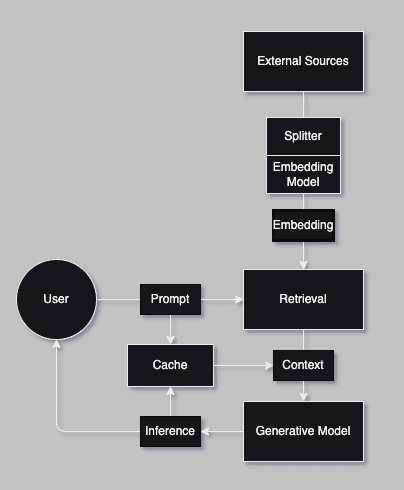
Let’s outline the steps to set up a pipeline for generating embeddings and integrating them into our Agent:
Reading the File: We start by reading the content of a text file. The file is loaded as a single string, preserving its structure for processing.
Splitting into Chunks: The text is split into smaller, manageable chunks. This ensures that large texts can be processed efficiently and within the constraints of the embedding model. For our implementation, we split the text into chunks of 500 characters by default. Overlapping chunks are created to maintain context between sections.
Generating and Storing Embeddings: We generate vector representations for each text chunk using a pre-trained embedding model. These embeddings encode the semantic meaning of the text and allow us to perform similarity comparisons.
Retrieving Relevant Chunks: We will encode the query into an embedding using the same model. Then, the cosine similarity between the query embedding and the embeddings of all text chunks will be calculated. The most similar chunks are identified and retrieved as the relevant context.
Chatbot with Embeddings - Architecture
Full book context With Embeddings
					from sentence_transformers import SentenceTransformer
from sklearn.metrics.pairwise import cosine_similarity
import requests

# Step 1: Read text from the .url file
def read_text_from_url(url):
    response = requests.get(url)
    response.raise_for_status() # Ensure the request was successful
    return response.text

# Step 2: Split the text into smaller chunks
def split_into_chunks(text, chunk_size=500):
    return [text[i:i+chunk_size] for i in range(0, len(text), chunk_size)]

# Step 3: Generate embeddings for the chunks
def generate_embeddings(chunks, model_name="all-MiniLM-L6-v2"):
    model = SentenceTransformer(model_name)
    return model.encode(chunks)

# Step 4: Find the most relevant chunk(s) for a given query
def find_relevant_chunks(query, chunks, embeddings, top_k=1):
    model = SentenceTransformer("all-MiniLM-L6-v2")
    query_embedding = model.encode([query])
    similarities = cosine_similarity(query_embedding, embeddings)[0]
    top_k_indices = similarities.argsort()[-top_k:][::-1]
    return [chunks[i] for i in top_k_indices]
In the next snippet, we turn our full book text into embeddings and then use our find_relevant_chunks to only pull out our relevant parts.
					# URL of "The Great Gatsby" text
url = "https://www.gutenberg.org/cache/epub/64317/pg64317.txt"

# Main Workflow
print("Reading text from the URL...")
text = read_text_from_url(url)

print("Splitting text into chunks...")
chunks = split_into_chunks(text)

print("Generating embeddings...")
embeddings = generate_embeddings(chunks)

print("Finding relevant context...")
relevant_chunks = find_relevant_chunks(question, chunks, embeddings, top_k=1)
large_context_embedded = " ".join(relevant_chunks)
					Reading text from the URL...
Splitting text into chunks...
Generating embeddings...
Finding relevant context...
In the snippet below, we pass our embedded context to our model for inference.
					query = ask_question(
    question = "What are the main themes of The Great Gatsby?",
    context = large_context_embedded,
    session_history=""
)
					======================================================================
* User Question : What are the main themes of The Great Gatsby?
LLM Inference:

The Great Gatsby is known for its exploration of themes such as the
American Dream, class and social status, love and loss, and the corrupting
influence of wealth.

Evaluation Result: Yes
Evaluation Reasoning:
The answer is correct because the inference directly quotes the LLM's
response, which provides a clear and concise summary of the main themes in The
Great Gatsby. The response accurately captures the essence of the novel's
exploration of the American Dream, class and social status, love and loss, and
the corrupting influence of wealth.
======================================================================
Instead of responding with a summary of the text, the model now accurately responds with more nuance and gives us a responsible response.
Now, let’s explore another advanced RAG technique, a Semantic Cache.
Semantic Cache
A local cache can significantly improve response time for frequent queries by leveraging embeddings to cache similar queries. Storing previously retrieved results in a cache reduces the need for repeated retrievals, thus speeding up response generation. Instead of simply storing data or responses based on raw input queries, a semantic cache converts queries and cached data into embeddings. When a new query is made, it is also converted into an embedding. The cache then calculates the similarity between the query embedding and stored embeddings. If a sufficiently similar result is found, the cached response is returned.
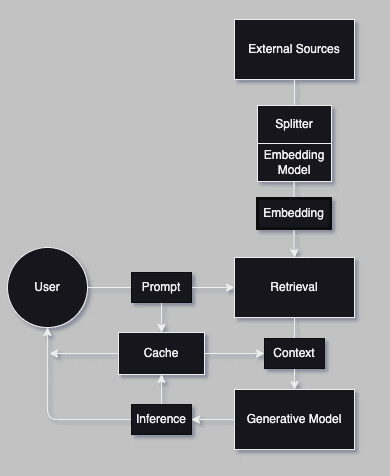
The snippet below sets up a connection to the Redis server we previously used.
					# https://redis.io/docs/latest/integrate/redisvl/user-guide/semantic-caching/
from redisvl.extensions.llmcache import SemanticCache

llmcache = SemanticCache(
    name=session_id,         # underlying search index name
    prefix="llmcache",       # redis key prefix for hash entries
    redis_url="redis://localhost:6379", # redis connection url string
    distance_threshold=0.1   # semantic cache distance threshold
)
We run a simple inference and store it in the cache store.
					query = ask_question(
    question = "Which team won the MLB World Series in 2024?",
    context = short_context,
    session_history=""
)

# Cache the question, answer, and arbitrary metadata
llmcache.store(
    prompt=question,
    response=list(query['inference_answer'])[0],
    metadata={"context": short_context}
)
					======================================================================
* User Question : Which team won the MLB World Series in 2024?
LLM Inference:

The Los Angeles Dodgers won the 2024 MLB World Series.

Evaluation Result: Yes
Evaluation Reasoning:
The answer is correct because the inference directly states that the Los Angeles Dodgers
won the 2024 MLB World Series, which matches the expected outcome.
======================================================================
'llmcache:db24b65be0cfc9fbd11aa8dac71bec8f88a81f27b08233b26be912e6290c8e23'
Next, we set up a list of questions and a loop that checks our Semantic Cache for similar queries.
					questions_list = [
    "Which team won the 2024 MLB World Series?",
    "Who emerged victorious in the 2024 MLB World Series?",
    "What team took home the 2024 World Series championship?",
    "Who won the Superbowl in 2024?",
]

print("======================================================================")
for q in questions_list:
    cached_response = llmcache.check(prompt=q)
    if cached_response:
        print(f"[Cache Hit] Q: '{q}'\nAnswer: Yes\n")
    else:
        print(f"[Cache Miss] No match in cache for Q: '{q}'\n")

print("======================================================================")
					======================================================================
[Cache Hit] Q: 'Which team won the 2024 MLB World Series?'
Answer: Yes

[Cache Hit] Q: 'Who emerged victorious in the 2024 MLB World Series?'
Answer: Yes

[Cache Hit] Q: 'What team took home the 2024 World Series championship?'
Answer: Yes

[Cache Miss] No match in cache for Q: 'Who won the Superbowl in 2024?'

======================================================================
In this snippet, you can see that 3 out of the 4 new queries match our previously answered query; thus, we can respond directly to that instead of asking the model to infer the same question.
Semantic caching bridges the gap between traditional query matching and a deeper understanding of intent by leveraging embeddings to store and retrieve contextually meaningful data. This approach enhances efficiency and ensures relevance in dynamic, high-demand environments. By utilizing semantic caching, systems can go beyond surface-level keyword matching to provide smarter, more context-aware responses. This methodology enhances the scalability and responsiveness of AI applications, particularly in NLP and search systems, enabling them to better meet user expectations in real-time scenarios. It is an essential tool for modern systems prioritizing relevance, speed, and adaptability.
Conclusion
In this blog, we explored how RAG (Retrieval-Augmented Generation) can be implemented using tools like LangChain, DSPY, and Redis to significantly enhance AI systems’ contextual awareness and accuracy. By integrating retrieval-based techniques with generative models, we addressed the limitations of static training data, enabling up-to-date and contextually relevant responses.
We covered the following key aspects:
-
Introduction to RAG: Understanding its purpose, advantages, and suitable use cases.
-
Simple RAG Example: Demonstrating a Wikipedia retriever to fetch relevant context and improve generative model performance.
-
Advanced Techniques:
-
Embeddings: Utilizing vector representations to capture semantic meaning and improve context retrieval accuracy.
-
Redis Cache: Accelerating responses and reducing redundant retrievals by caching results effectively.
-
Ranking Results: Ensuring relevance by scoring and ranking retrieved documents based on similarity.
-
Semantic Caching: Leveraging embeddings to reuse cached results for semantically similar queries, optimizing performance and scalability.
Key Takeaways
-
Enhanced Model Performance: RAG bridges static training data with real-time, dynamic knowledge by incorporating external sources.
-
Scalability: Embedding-based retrieval and Redis caching ensure the system can handle large-scale queries efficiently while maintaining fast response times.
-
Flexibility: Embeddings and caching allow the system to process complex and multifaceted queries, making it ideal for applications such as customer support, knowledge bases, and domain-specific Q&A.
By following these steps, you can build a cutting-edge, context-aware AI system that combines the strengths of retrieval-based and generative approaches. This hybrid strategy delivers accurate, relevant, and highly personalized experiences, empowering users with real-time actionable insights.

Planning, building, or scaling RAG and agentic systems?
Our experts can help you design the right architecture, implement robust retrieval pipelines, and operationalize your solution with production‑grade observability, security, and cost controls, so you realize business value faster and more reliably.


