

It’s hard to read about Generative AI today without running into Model Context Protocol (MCP). While many are familiar with the concept and its basics, the details of MCP and how it’s used are oftentimes a mystery. This paper will walk through everything you need to know to confidently understand MCP and evaluate its fit in your AI ecosystem.
MCP Overview
Tool Calling
Before going too deep into MCP, it’s important to first understand tool calling. Originally introduced as function calling
by OpenAI in 2023, tools provide LLMs with methods to interact with the world, most commonly for access to user-defined logic and data. Tools have become a key enabler for AI Agents, allowing these intelligent systems to use their reasoning capabilities to decide when and how to interact with external systems and data to take action within their environment. It’s worth noting that the LLM is not directly calling the tool, but rather deciding what needs to be called and relying on the application to call it and send back the results.
Below is an explanation of how this works in practice, using fetching current stock prices as an example.
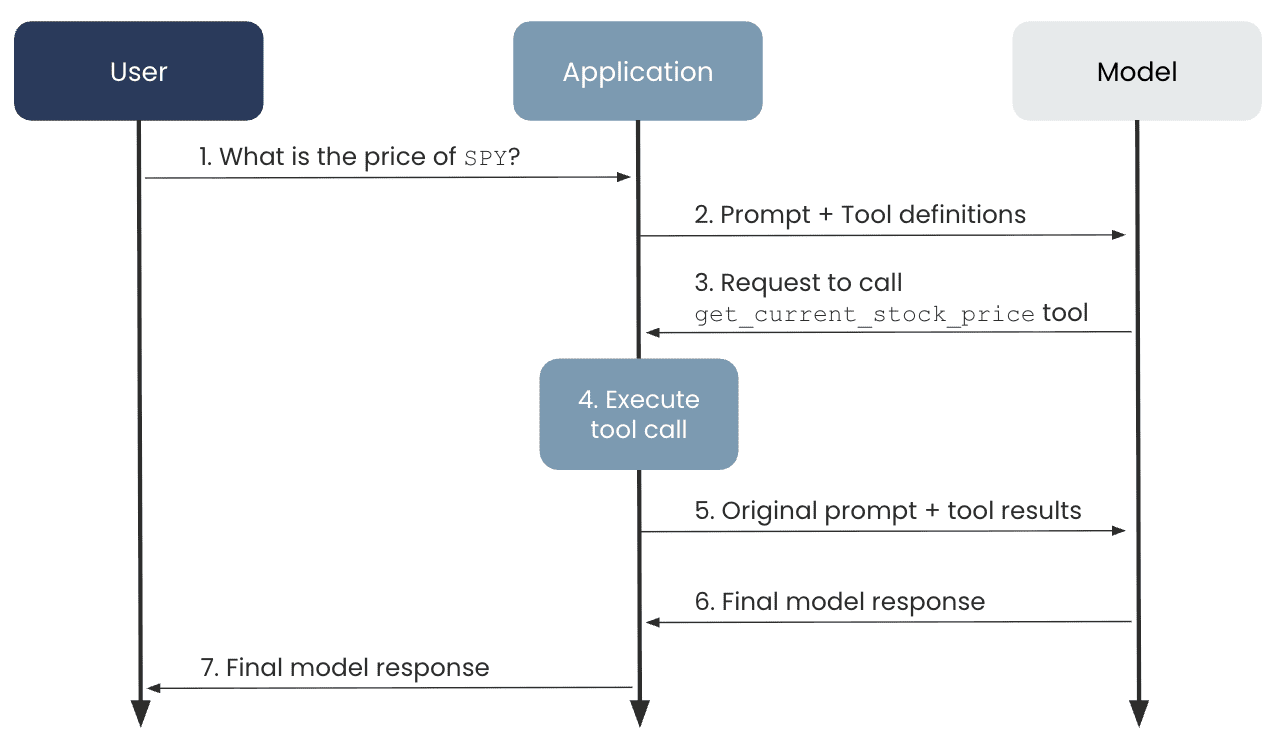
Let’s say you wanted to build a chatbot that talks to people about their portfolio stock performance and the latest buzz around those companies. This data changes fast! It wouldn’t make any sense to try to download, manage, and inject this information into the chat context. Instead, we can have the chatbot act agentically. It receives a user query about a stock, recognizes what API it can call to get the ticker, and responds. Let’s break that down:
The user sends a prompt to the AI application asking,
What is the price of SPY?
The application sends the user’s prompt to the LLM along with the details of an available tool,
get_current_stock_price(ticker). This tool definition is provided to the LLM as JSON:
					{
    "type": "function",
    "name": "get_current_stock_price",
    "description": "Retrieves current stock price for a given ticker.",
    "parameters": {
        "type": "object",
        "properties": {
            "ticker": {
                "type": "string",
                "description": "The stock's ticker symbol."
            }
        },
        "required": ["ticker"],
        "additionalProperties": false
    },
    "strict": true
}
The LLM decides that it needs to call the tool to get the necessary information to generate a response, so it sends a response back to the application requesting the tool to be called
The application calls the tool and gets back the answer.
The application sends the response back to the LLM with additional information about the tool result:
					{
  "type": "function_call_output",
  "tool_call_id": "call_abc123",
  "output": {
    "price": 653.02
  }
}
The LLM generates a response and sends it back to the application
The application sends the response back to the user
This flow enables the LLM to have access to real-time data to answer questions about stock tickers, which would never have been feasible without the introduction of tools.
Enter MCP
While the above use case is great, there are practical challenges with scaling tool usage.
How can I get my custom tools into the AI applications I use on a daily basis, like Amazon Q Developer, Claude Desktop, and Cursor?
How can I make my tool logic available to other developers or other internal applications that may also need the same data and logic?
How do I make sure my team is using consistent tools, and how do I ensure those tools are governed and secure?
How do I standardize tool metadata and ensure it’s kept in sync as tools are updated?
MCP aims to solve these challenges and more. Introduced by Anthropic in November of 2024, the goal of MCP is to standardize how these tools are integrated with AI applications. Instead of ChatGPT, Cursor, Claude Code, etc, all having to build their own integrations with GitHub, as an example, GitHub can publish its own integration and enable these applications to use it, assuming that they implement the MCP protocol.
MCP Features
Client Server Architecture
There are a few core components of MCP to be aware of:
MCP host – the AI application that contains one or more MCP clients.
MCP client – the component that is responsible for connecting to a single MCP server.
MCP server – the component that contains the tools to carry out actions or retrieve additional context for the application.

Primitives
While this paper has so far focused on MCP enabling tool usage, there are two additional primitives that are natively supported by MCP servers: prompts and resources.
Prompts enable MCP servers to expose templatized prompts to MCP clients, with the goal of enabling users to select and customize the prompts. The key here is user-controlled – it is up to the user to decide when to use an MCP provided prompt. It can serve as a starting point for some common actions that the MCP server can help carry out.
Resources are another primitive designed to enable MCP servers to provide additional context, such as files, metadata, or some other application-specific information. Resources are application-controlled, meaning it’s up to the MCP client on how to use the information. For example, an MCP server might expose documents via the resources primitive, but it’s up to the client to decide which documents are used as part of the context.
In summary, each of these primitives can be exposed via MCP servers, but they are used for slightly different purposes:
Tools – model-controlled. Used to interact with external systems.
Resources – application-controlled. Used to provide additional context to the model.
Prompts – user-controlled. Used to give users a starting point or example, templatized prompts for interacting with the server.
Advanced Features
A few additional MCP features to be aware of are roots, sampling, and elicitation. These are primarily MCP client features, meaning that you may not run across them unless developing a user-facing application that implements the MCP protocol.
Roots are boundaries on a filesystem that MCP can operate within. By defining roots in the MCP client, you can enable a user to select which directories and files an MCP server should have access to, ensuring that it does not use sensitive or irrelevant information. For example, if using our stock ticker application from above, maybe a user has a folder of personal research they’ve done on various companies and would like to give that to the MCP client as context. The user could define roots around that folder to ensure that only those documents are used and not other files on their computer.

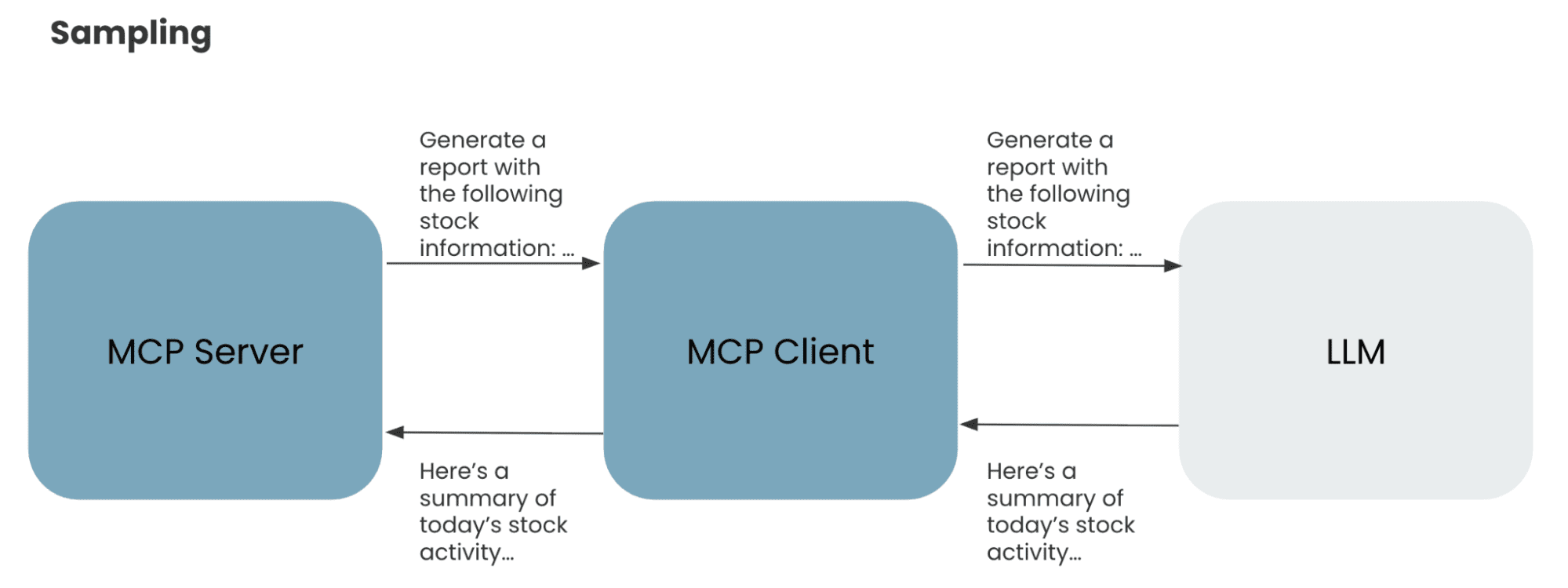
Sampling enables MCP servers to request completions or generations from LLMs without directly having access to the model. Instead, if the MCP client supports sampling, an MCP server can send a request back to the client, indicating that it needs an interaction with the LLM. The client will facilitate that communication and send the response back to the server so that it can continue its task. This enables separation of concerns where only the client has control over model access and selection, but enables the server to have additional functionality by calling the LLM. This is a useful feature for servers that need access to LLMs for things like augmenting data, summarizing responses, etc.. Sampling provides servers access to that functionality without needing to worry about the complexity of how to call the model.
Lastly, elicitation enables MCP servers to request additional information from users through the client during an interaction. This allows clients to control all interactions with users, but enables servers to get additional context on demand as needed. As an example, imagine our MCP server has generated a report on today’s market activity that the user requested to be saved, but never specified which location. The MCP server could use elicitation to prompt the user to input a path on their computer where the report should be saved.

MCP Usage Patterns
Now that we’ve walked through how MCP came about and the problem it’s trying to solve, next, we need to highlight the different ways MCP is getting adopted.
User / Local MCP
This pattern is focused on connecting AI applications on a user’s machine with their external systems. Using the earlier example of GitHub – if I’m developing locally with Cursor and I want Cursor to be able to create an issue on my repo for me, I’d need to integrate with the GitHub API to make that happen.
To enable this, I would download the official GitHub MCP server, run it locally on my machine, wire it up into Cursor, and then boom – all the tools that GitHub has built into their MCP server are available to Cursor. This benefits all parties – GitHub gets additional interaction with their platform, Cursor gets the benefit of a great integration without having to write it from scratch, and the user gets the benefit of their favorite AI tools integrated with the systems they frequently use.

To recap, this pattern is geared towards individual users who want to connect their favorite AI applications with their data that is stored in various systems. Typically, everything (except the external system) would be configured and run on the user’s local machine.
Remote MCP
Given the security concerns of users downloading and running open-source MCP servers on their machines, companies may opt to hand-select specific MCP servers that are approved for use and host them on their cloud infrastructure. This pattern results in more complexity and maintenance, but reduces the risk of users downloading and running malicious software on their machines. To manage this complexity, specialized tooling such as MCP Proxies and AI Gateways is emerging to provide security and observability for these remote MCP servers.
Enterprise MCP
Another pattern that is starting to emerge for MCP is using it as an abstraction layer in front of internal applications. Imagine you run an online retail company and have a transaction service that exposes all of your company’s transactions over an API. That data could be valuable for a number of internal AI applications.
For example, say you have an internal chat application for marketing managers to ask questions like How did my recent promotion impact sales?
or maybe you have a customer support agent who needs access to a user’s transactions for resolving support requests. Both of these use cases would need access to the transaction data in order to carry out their tasks. Instead of each team building custom tools to integrate with that API, MCP can act as a consistent, governed interface that each application can consume. This reduces redundancy and promotes a trusted standard for giving AI applications access to this key information.

This pattern is more of an architectural decision of abstraction. Implementing MCP to sit in front of your internal applications can provide a unified access pattern for AI applications, but at the cost of complexity, operational overhead, and latency. It’s also worth noting that the MCP server in this case could be a third-party MCP server sitting in front of some SaaS or PaaS applications used by your company, such as Salesforce or Snowflake.
MCP as a technology is still maturing, and this pattern specifically has not yet seen significant adoption, despite growing interest.
MCP Challenges
While MCP can offer clear benefits for integrating AI applications with your company’s systems and data, it is still an emerging technology that comes with risk.
Security
One of the most critical challenges facing MCP today is security. After a number of security vulnerabilities[1] were exploited on popular MCP Servers such as GitHub, the AI community is taking a critical look at MCP’s readiness from a security perspective.
The local MCP pattern defined above faces the same challenge as most open-source software. It’s easy for users to download this software and run it on their machines, increasing a company’s risk of malicious code being executed within their network.
In the case of the GitHub MCP server, it wasn’t necessarily that the server had malicious code, but rather that bad actors found a way to abuse the server. Attackers would create malicious GitHub issues on repositories, and when a developer using the GitHub MCP servers asks to check on a repository’s issues, the agent would read the malicious issue and get a prompt injected into its context that would leak sensitive repo data publicly.
These types of unique attacks are why the risk of open-source, untrusted software is greater than ever with MCP. It’s an emerging technology that’s often not well understood and is ripe for vulnerabilities.
An additional concern with MCP specifically is that some companies are releasing beta MCP servers almost as a marketing activity to gain visibility for their products. Even though these may not have malicious code, it’s important to properly vet these servers and be sure they are enterprise-ready prior to releasing them to users in your organization.
The enterprise MCP pattern has its own unique challenges with regard to security. One key challenge is setting proper authorization schemes to support tool-level access. If we took our customer support example earlier and wanted to extend that to enable the support representative to refund a transaction, we would need an update operation provided by the MCP server. However, we only want specific systems to access that update operation; the rest should only have access to any read operations. While this should be possible with MCP, you may need to handwrite some authorization checks in the server code. Given the potential negative side effects of giving agents write access to your systems, designing a robust security scheme needs to be top of mind.
Governance
As MCP servers proliferate across an organization, whether for personal productivity use or for the enterprise pattern defined above, establishing standards becomes essential to protect against the aforementioned security concerns. One emerging pattern is placing enterprise-controlled, trusted MCP servers behind an AI Gateway. This provides discoverability of MCP servers, standardized access, and additional safety controls like rate limiting and timeouts.
Observability
Given the introduction of additional servers and APIs used with MCP, it’s critical to establish proper observability to know which MCP servers are getting called for a given request. There are many tools available that provide tracing for AI applications, meaning that as a request flows between models, applications, and MCP servers, there can be a clear trail of what was called with what context, aiding in debugging any issues.
Token Consumption
MCP faces the same challenge as AI Agents that use many tools – token consumption. Each MCP server added to the application results in metadata that needs to be provided to the LLM, increasing the amount of tokens used. As the complexity of the application grows, this could result in a significant increase in token usage, increasing the cost of your system.
Bloated Model Context
In the same vein, all of this tool metadata that bloats the prompts can also start to affect performance. The more context provided, the harder it can be for the model to discern and effectively make use of all that context. A recent paper highlighted this exact challenge. Specifically on complex, multi-task operations, LLMs can struggle to make use of this long context and effectively use the MCP servers.
Takeaway
MCP is rapidly changing the AI landscape. Through seamlessly connecting AI applications with an organization’s systems and data, the possibilities are limitless.
However, adoption of bleeding-edge technology does not come without risk. It’s important to understand how the technology works and where the pitfalls are to properly assess its fit within your organization.
Contact phData for guidance on how MCP can play a role in your organization’s AI ecosystem.

Unlock the full potential of MCP in your AI ecosystem.
Connect with phData’s AI experts to find the highest-impact MCP use cases for your organization and design a secure, value-driven AI roadmap.
[1] – Sources
- https://nvd.nist.gov/vuln/detail/CVE-2025-54073
- https://nvd.nist.gov/vuln/detail/CVE-2025-6514
- https://nvd.nist.gov/vuln/detail/CVE-2025-53818
- https://nvd.nist.gov/vuln/detail/CVE-2025-5277
- https://invariantlabs.ai/blog/mcp-github-vulnerability
- https://adversa.ai/blog/asana-ai-incident-comprehensive-lessons-learned-for-enterprise-security-and-ciso/
- https://arxiv.org/pdf/2508.14704
- https://modelcontextprotocol.io/docs/learn/server-concepts
- https://modelcontextprotocol.io/docs/learn/client-concepts
- https://modelcontextprotocol.io/specification/draft/basic/security_best_practices
- https://www.redhat.com/en/blog/model-context-protocol-mcp-understanding-security-risks-and-controls
- https://socradar.io/mcp-for-cybersecurity/security-threats-risks-and-controls/real-world-mcp-server-vulnerabilities/#:~:text=In%20June%202025%2C%20Asana%20discovered,organization%20to%20users%20in%20another.


