
In data analytics and business intelligence, efficiency and collaboration are more important than ever. Sigma Computing, a cloud-based modern analytics platform, has introduced a powerful feature called Live Edit, which is transforming how users interact with data and collaborate in real time.
In this blog, we will break down what Live Edit is, how it works, and why it’s a game-changer for both business and data teams.
Real-time collaboration is essential for improving the speed, accuracy, and transparency of decision-making. Sigma’s Live Edit feature supports this by enabling multiple users to work together simultaneously, get instant feedback, and rely on a single, centralized source of truth.
By making teamwork faster and smoother, Live Edit helps:
Reduce human errors
Streamline workflows
Encourage cross-functional collaboration
Improve overall efficiency in data analysis
What is Live Edit?
Live Edit in Sigma Computing is a feature that allows users to make real-time edits to their workbooks and data models without needing to reload or refresh the page.
This means that any changes to datasets, formulas, or visualizations are reflected instantly, making the entire analytics experience smoother and more dynamic.
Why Traditional Tools Fall Short
In many traditional analytics tools, making simple changes like editing a formula, adding a filter, or adjusting a chart requires reloading the entire page or dataset.
This often leads to:
Slower workflows
Interruptions during analysis
Confusion about whether you’re viewing the latest version
Frustration when working with large datasets or in team environments
Sigma Computing’s Live Edit eliminates this friction by providing real-time, seamless updates as you work. It creates an environment where edits are reflected immediately, which enhances both individual productivity and team collaboration.
What are the Benefits of Using Live Edit?
Instant Feedback: Whether we are tweaking a visualization or adjusting a data model, the changes are visible on the fly, which allows for more dynamic data exploration.
Real-Time Collaboration: Every team member can see each other’s changes in real time, which encourages a more collaborative and transparent approach to data analysis. This feature is particularly valuable for teams working remotely or across different time zones.
Reduced Waiting Time: With traditional analytics tools, we may need to wait for the page to reload or refresh after each change and pick the latest copy of the dashboard and work on it. Live Edit removes this delay, allowing you to make continuous updates without interruptions. This can significantly speed up data workflows and decision-making.
Increased Efficiency: The ability to see updates immediately means that teams can iterate more quickly, leading to faster insights and decisions. It eliminates unnecessary refresh cycles and waiting for updates to propagate, which ultimately speeds up the entire process.
Empowering Non-Technical Users: Business users and decision-makers can modify data models, create visualizations, and explore data without needing deep technical expertise. This fosters a more data-driven culture within organizations.
Improved Accuracy: Real-time updates reduce the risk of working with outdated data or incorrect assumptions. As data evolves, all users in the workspace can see the changes as they happen, ensuring that everyone is always working with the most up-to-date information.
Better Decision Making: In the world of business, data-driven decisions are crucial for success. Live Edit empowers teams to make better decisions faster by facilitating smoother collaboration and providing immediate access to fresh insights.
Error-Free Collaboration: Since all changes are instantly visible to others, there’s less room for miscommunication or confusion. Everyone is on the same page at the same time, ensuring that version mismatch errors or outdated data are minimized.
How to Use Live Edit in Sigma Computing
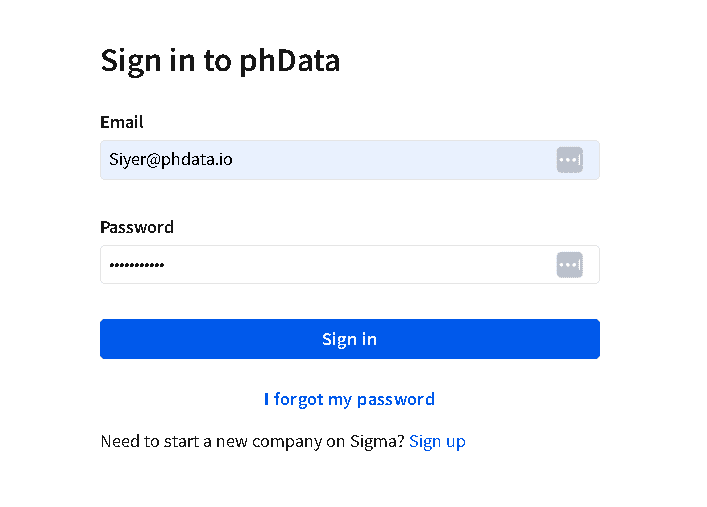
Step 1: Sign In to Sigma Computing
Go to the Sigma Computing login page and enter your credentials (email and password, or Single Sign-On if set up). If you don’t have an account, we will need to create one or ask your organization’s admin to invite you.
Step 2: Open or Create a Workbook
Once logged in, we will see the Sigma interface.
To use Live Edit, either open an existing workbook or create a new one.
To create a new workbook: Click on the New Workbook button, choose your data source (e.g., Google Sheets, Snowflake, etc.), and proceed to create the necessary sheets.
Navigate to the project or report that you want to collaborate on. This could be a data model, dashboard, or any other type of report that you have access to within Sigma.

Step 3: Enable Live Edit Mode
Sigma supports live editing for collaborative environments. To enable this mode:
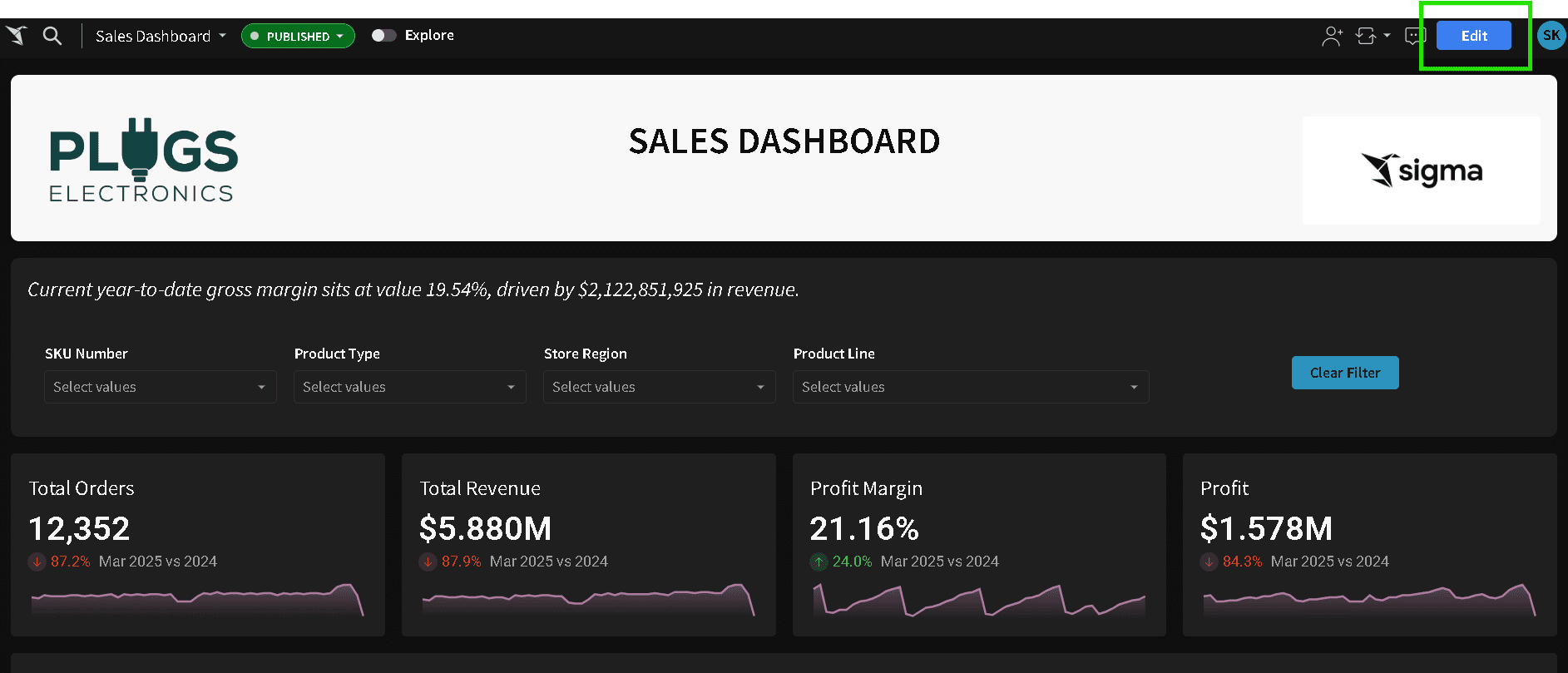
Click the Edit button, and Live Edit Mode is automatically enabled.
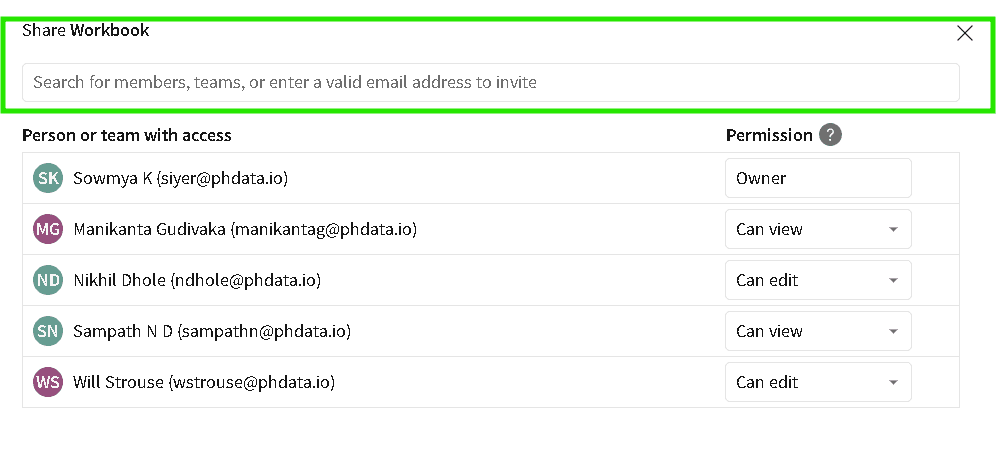
Click on the Share icon at the top right of your workbook.
Invite collaborators by entering their email addresses, or copy the shareable link if the document is already shared with your team.
Note: Make sure to set appropriate permissions (view or edit) for your collaborators.
Step 4: Collaborate in Real Time
Once Live Edit mode is enabled, you and your collaborators can start making changes.
We can edit tables, data, and visualizations directly within the workbook.
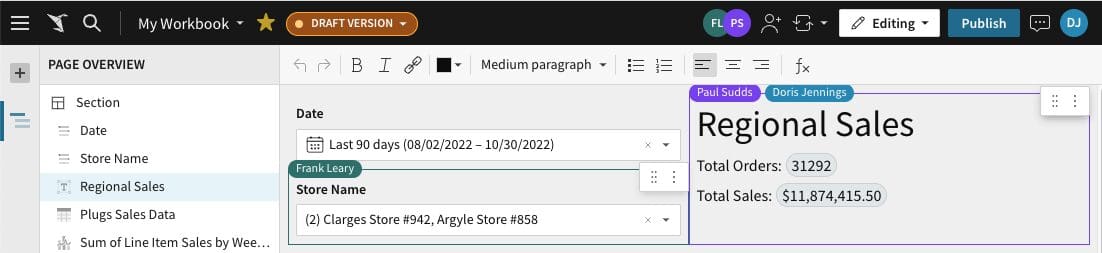
Every change made by collaborators is automatically reflected across everyone’s screen, in real-time.
Track who is making changes: We see each collaborator’s name or avatar next to the cell they are editing, so you can easily track who is working on what.
Step 5: Working with Data Tables and Visualizations
Editing Data Tables: Click on any cell in the table to edit the data directly. For larger datasets, we can filter and search within the table to find the data you want to modify.
Creating or Editing Visualizations: We can create charts or modify existing ones by selecting the data you want to visualize, clicking on the chart icon, and choosing the type of chart you want to use (e.g., bar chart, line chart, pie chart).
Any adjustments made to the visualization will update for all users involved in the session.
Step 6: Saving and Finalizing Changes
Changes made during the Live Edit session are automatically saved. We do not need to worry about manually saving the workbook.
Once the changes are finalized, ensure that we have saved any necessary versions or snapshots for your team.
If needed, we can revert changes or create different versions using Sigma’s version history feature
Step 7: Communicate with Team Members
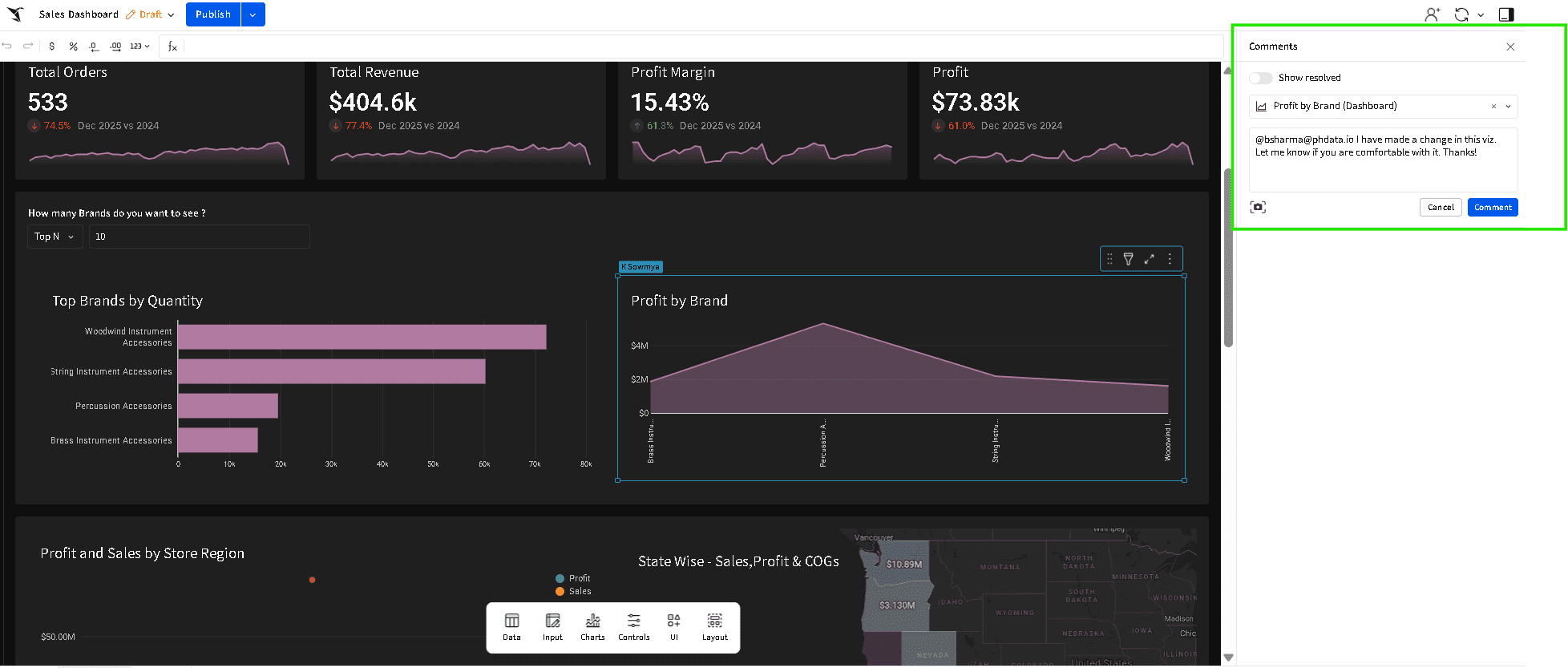
Comment features to communicate with your team while working in Live Edit mode. This ensures that all participants stay aligned during real-time collaboration.
We can leave comments on specific data cells or visualizations, and these comments will be visible to all users.
Step 8: Exit Live Edit Mode
Once done with your real-time collaboration, we can exit Live Edit mode by simply closing the workbook.
Any changes made during Live Edit are automatically saved as a draft. Be sure to click the Publish button so that all updates are reflected in the published version before closing the workbook. Once published, you’re good to go!
Use Cases of Live Edit
Dashboard & Report Creation: Teams of data scientists and stakeholders collaborate in real time to design and refine dashboards or reports.
Cross-Department Collaboration: Teams from different departments (e.g., finance and marketing) collaborate on shared datasets and reports, refining them in real time.
Ad-hoc Data Requests: Teams quickly modify existing reports to accommodate urgent data requests and provide updated insights.
Real-Time Data Exploration: Analysts explore and visualize data together in real-time.
Stakeholder Feedback: Stakeholders review and provide feedback on reports in real time, leading to faster refinements.
Best Practices
-
Set Roles & Permissions: Define who can edit and who can view/comment to ensure smooth workflows and prevent unauthorized changes.
-
Establish Guidelines: Set clear naming conventions, workflows, and documentation for consistency and clarity.
-
Communicate Regularly: Stay in sync before making significant changes to avoid conflict.
-
Leverage Version Control: Use version history to track changes, revert if needed, and document key changes for transparency.
-
Work in Focused Sessions: Break tasks into smaller pieces, and schedule dedicated editing sessions to avoid simultaneous conflicts.
-
Ensure Data Integrity: Validate data before making edits and appoint a data owner to ensure accuracy.
-
Use Visuals for Clarity: Create clear visualizations to align on key insights and reduce confusion during collaboration.
-
Seek Continuous Feedback: Use the commenting and annotation features to get ongoing feedback and iterate on work quickly.
Closing
Live Edit in Sigma Computing is a powerful feature that transforms how teams collaborate on data analysis and reporting. By enabling real-time updates, seamless communication, and simultaneous edits, it accelerates decision-making, improves data accuracy, and enhances productivity.
Whether you are cleaning data, building dashboards, or making business-critical decisions, Live Edit ensures that everyone is on the same page, fostering a more efficient and collaborative work environment. With this feature, Sigma Computing empowers teams to work smarter, faster, and more cohesively, driving better outcomes across the board.

Ready to take full advantage of Sigma and Live Edit?
Partner with phData to design and implement collaborative analytics workflows tailored to your business.
FAQs
Can I track changes made by different team members during a Live Edit session?
Yes, Sigma Computing tracks changes made by different users in real-time. We can see who is editing which part of the workbook, and every change is instantly reflected for all users. This visibility helps prevent conflicts and ensures accountability within the team. Additionally, Sigma’s version history allows you to review and revert any changes if necessary.
How secure is Live Edit in Sigma Computing?
Sigma Computing ensures a high level of security for Live Edit sessions. Data is encrypted both in transit and at rest, and user access is controlled through permissions and role-based access. Only authorized users can participate in a Live Edit session, ensuring your data remains secure during collaboration..