
Most BI dashboards have no diff, reviewer, or revert button when something changes.
Sigma’s Workbooks-as-Code API turns a workbook into a YAML file Git can diff and review.
A working Sigma to Git integration needs just four GitHub secrets and two shell scripts.
Write-back into Sigma is still one-way: Only the simplest workbooks survive the beta’s import path.
Sigma does a lot of the heavy lifting for us. Someone builds a profit-and-loss workbook in an afternoon, points it at Snowflake’s cloud data platform, shares a link, and the business has a dashboard. Speed is the whole point. The Sigma API is what lets that speed extend past the browser. But none of that speed comes with the kind of version history Git gives source code.
Then a quarter later a question arrives that nobody can answer: who changed the revenue filter, when, and can we get the old version back?
The governance gap
Every BI and analytics platform stores your content somewhere, and most offer some form of “restore previous version.” What they generally don’t offer is the set of things software engineering has taken for granted for twenty years: a diff you can actually read, a reviewer who has to approve it before it ships, a branch where a risky change can live until it is safe, and a searchable history that ties the state of a dashboard to a date and a person.
In our migration and modernization work, we hear the same request from nearly every data team we sit with: can we treat dashboards like code?
For Sigma, the answer is now largely yes. Sigma’s Workbooks-as-Code API, currently a private beta, will hand you the complete definition of a workbook as a YAML document over the REST API. Once it is a text file, Git does what Git does.
A workbook stops being a black box the moment it becomes a file you can diff.
Below is the setup we built and ran end to end: what it looks like, how to wire it, and exactly where the beta stops being useful. That last part matters as much as the rest, and it is not in the documentation.
What a workbook looks like as code
Export a workbook and you get a single YAML document describing every element on the canvas: tables, charts, filters, columns, conditional formats, actions, and the layout that arranges them. One of our profit-and-loss workbooks came to 2,432 lines and about 85 KB.
It opens with the workbook’s identity, then descends into the document itself:
workbookId: a1b2c3d4-5e6f-47a8-9b0c-1d2e3f4a5b6c
name: Dynamic Profit and Loss Statement
url: >-
  https://app.sigmacomputing.com/<your-org>/workbook/Dynamic-Profit-and-Loss-2GrEVQSZjR3T
documentVersion: 1
document:
  elements:
    - id: 7gAEk98gvI
      kind: text
      body: '## <span style="color: #131b39">**Outlook Revenue Forecasting**</span>'
    - id: Nmt8oz0gX6
      kind: table
      source:
        primarySource:
          kind: element
          elementId: pkQ0xRBpTw
The practical consequence shows up the first time you change something. Retitle a section or restyle a header, export again, and the review turns into two lines:
 - id: 7gAEk98gvI
     kind: text
-    body: '## <span style="color: #131b39">**Outlook Revenue Forecasting**</span>'
+    body: '## <span style="color: #0091ae">**Outlook Revenue Forecasting**</span>'
That is a dashboard change with a reviewer, a timestamp, an author, and a revert button. Nothing else in the BI stack gives you that.
The Sigma API architecture
The whole system is three tiers and one loop. Sigma holds the live workbook and exposes it over the REST API. GitHub holds the credentials, the automation, and the history. Your machine holds a clone you can open in an editor.
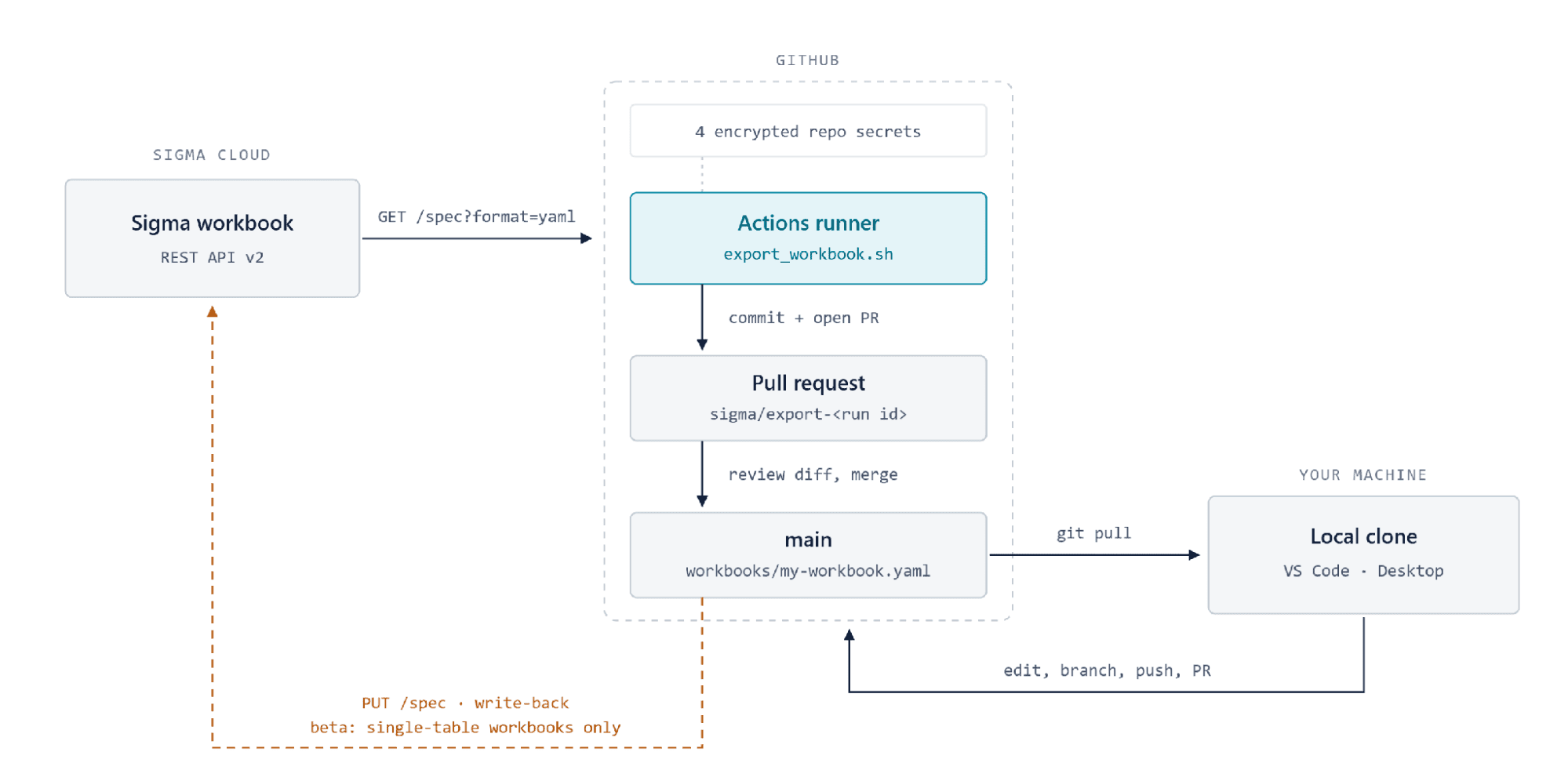
The round trip. The solid path (export, commit, review, merge, pull, edit, push) is the part that works today. The dashed amber path is the beta write-back into Sigma; treat it as optional, and read the last section before you rely on it.
That picture contains two design choices worth calling out. First, nothing runs on a laptop that has to be switched on: the export is a GitHub Actions job, so the credentials live in GitHub’s encrypted secret store rather than on somebody’s machine. Second, an export never writes straight to main. It opens a pull request, which means every sync is a diff a human looks at before it becomes history.
Building it, in five steps
You need Admin access in Sigma (for step 1 only), a private GitHub repository, and Workbooks-as-Code enabled on your org. That last one is a private beta with no toggle you can see, so ask your Sigma account team. Don’t wait on the answer, though: the export in step 5 tells you definitively either way.
01. Create API credentials in Sigma
Go to Avatar > Administration > Developer access > Create new. Tick the REST API scope, name it something traceable like github-workbooks-as-code, and set the owner to a user who can edit the workbook.
Copy both the Client ID and the Client Secret before you close the dialog. The secret is shown exactly once and cannot be recovered; if you lose it, you delete the credential and start over.
02. Point at the right regional host
Sigma’s API host depends on which cloud your org runs in, AWS (Amazon Web Services) or Google Cloud Platform (GCP), and it is not the same hostname you use in the browser.
API base URL by region
| Region | API base URL |
|---|---|
AWS US | https://aws-api.sigmacomputing.com |
GCP | https://api.sigmacomputing.com |
AWS EU | https://aws-api.eu.sigmacomputing.com |
Azure / other | Confirm the host with your Sigma admin |
Here is the wrinkle we hit: orgs on both AWS US and GCP browse at app.sigmacomputing.com, so the browser URL cannot tell you which API host you need. Do not go hunting. Start with aws-api.sigmacomputing.com; if you get a 401 later, switch to api.sigmacomputing.com. It is a 10-second edit and the logs will tell you.
03. Store four secrets in GitHub
In the repo, go to Settings > Secrets and variables > Actions and add these one at a time. GitHub encrypts them; nobody, including you, can read them back afterwards.
Repository secrets
| Name | Value |
|---|---|
SIGMA_BASE_URL | The base URL from step 2 |
SIGMA_CLIENT_ID | Client ID from step 1 |
SIGMA_CLIENT_SECRET | Client Secret from step 1 |
SIGMA_WORKBOOK_ID | Leave this one for now — see the next section |
No quotes, no trailing whitespace. A stray trailing space is the single most common cause of a mysterious 401, and the field gives you no hint that it is there.
04. Write the export script
The setup relies on two small shell scripts that handle everything. The first trades the client credentials for a bearer token:
#!/usr/bin/env bash
set -euo pipefail
curl -s -X POST "${SIGMA_BASE_URL}/v2/auth/token" \
  -H "Content-Type: application/x-www-form-urlencoded" \
  -d "grant_type=client_credentials" \
  -d "client_id=${SIGMA_CLIENT_ID}" \
  -d "client_secret=${SIGMA_CLIENT_SECRET}" \
  | jq -r '.access_token'
The second pulls the spec and refuses to pass silently. Both guards below exist because we tripped over them: a missing directory turns into a cryptic exit 23, and a wrong endpoint can return 200 with an empty body, which then commits an empty file over your workbook’s history.
#!/usr/bin/env bash
set -euo pipefail
TOKEN="$(scripts/sigma_auth.sh)"
[ -n "${TOKEN}" ] && [ "${TOKEN}" != "null" ] || { echo "ERROR: no token"; exit 1; }

mkdir -p workbooks
CODE=$(curl -s -o workbooks/my-workbook.yaml -w "%{http_code}" -X GET \
  "${SIGMA_BASE_URL}/v2/workbooks/${SIGMA_WORKBOOK_ID}/spec?format=yaml" \
  -H "Authorization: Bearer ${TOKEN}" -H "Accept: application/yaml")

echo "HTTP ${CODE}"
[ "${CODE}" = "200" ] || { cat workbooks/my-workbook.yaml; exit 1; }
[ -s workbooks/my-workbook.yaml ] || { echo "ERROR: 200 but empty file"; exit 1; }
echo "Exported $(wc -c <workbooks/my-workbook.yaml) bytes"
05. Automate it with GitHub Actions
One workflow runs the export on demand and opens a pull request with whatever changed:
name: Sigma – Export workbook
on:
  workflow_dispatch:
jobs:
  export:
    runs-on: ubuntu-latest
    env:
      SIGMA_BASE_URL:      ${{ secrets.SIGMA_BASE_URL }}
      SIGMA_CLIENT_ID:     ${{ secrets.SIGMA_CLIENT_ID }}
      SIGMA_CLIENT_SECRET: ${{ secrets.SIGMA_CLIENT_SECRET }}
      SIGMA_WORKBOOK_ID:   ${{ secrets.SIGMA_WORKBOOK_ID }}
    steps:
      - uses: actions/checkout@v5
      - run: chmod +x scripts/*.sh && scripts/export_workbook.sh
      - uses: peter-evans/create-pull-request@v6
        with:
          branch: sigma/export-${{ github.run_id }}
          title: "Sync workbook from Sigma"
          commit-message: "chore: export workbook spec from Sigma"
One repository setting is easy to miss and produces a confusing failure on the last step. Under Settings > Actions > General > Workflow permissions, choose Read and write permissions and tick Allow GitHub Actions to create and approve pull requests. Without it, the export succeeds and the pull request step fails.
The trap that costs everyone an afternoon
Your workbook’s browser URL ends in a short code:
https://app.sigmacomputing.com/<your-org>/workbook/Dynamic-Profit-and-Loss-2GrEVQSZjR3T
                                                                            └── workbookUrlId
workbookUrlId. The API does not want it. The API wants the workbookId, a UUID you never see in the browser. Feed the API the URL code and you get a bare 404 with no explanation, no hint that you have the right endpoint and the wrong kind of identifier, and no obvious reason to suspect there are two identifiers at all.
So do not guess. Ask Sigma. The list endpoint returns both, side by side:
curl -s "${SIGMA_BASE_URL}/v2/workbooks?limit=500" \
  -H "Authorization: Bearer ${TOKEN}" \
  | jq -r '.entries[] | [.workbookId, .workbookUrlId, .name] | @tsv'
a1b2c3d4-5e6f-47a8-9b0c-1d2e3f4a5b6c    2GrEVQSZjR3T    Dynamic Profit and Loss Statement
└─────────── workbookId ───────────┘  └workbookUrlId┘  └───────────── name ──────────────┘
workbookId is what goes into SIGMA_WORKBOOK_ID. Keep two practical notes in mind: match on the urlId rather than the name, because organizations routinely have several workbooks with identical names, and page through the results, since a busy org will not fit in one response.
When that lookup returns a row, it has quietly answered two other questions for you. Your credentials are valid and your regional guess was right.
The return trip, and why it does not work yet
Getting a workbook out of Sigma works well. Putting an edited one back in does not, yet. In our testing, only the simplest workbook made it back — a single table with no joins. Anything with joins or input tables was rejected.
Exporting is like photographing a room. Importing asks Sigma to rebuild the room from the photo, and the half of Sigma that writes the file uses shorthand the half that reads it refuses to accept. The two halves simply do not agree yet.
Of the rejections we hit, two were harmless debris you can simply delete. The others are structural, and one is fatal: every join carries groupingId: base Sigma’s shorthand for “not grouped,” which the importer cannot resolve). That rules out essentially any workbook worth version-controlling. Nothing can hurt you in the attempt, though. Every rejected write failed with a 400 before changing anything. If you want it fixed, send your Sigma account team the failing requestId values; these are specific, reproducible bugs. (The write route is PUT /v2/workbooks/{workbookId}/spec, found by trying.)
So plan for a one-way trip: people build in Sigma, Git keeps the record. Which raises the obvious question.
Keeping it in sync without pressing a button
Nobody remembers to click Export after editing a dashboard, so a workflow you run by hand is fine for a demo and useless as a practice. There is no Sigma webhook to subscribe to either. What works is to let GitHub check on a schedule and commit only when the file actually changed, which is the workflow from step 5 with two additions:
on:
  schedule:
    - cron: '*/30 * * * *'      # every 30 minutes, UTC

# ...same secrets and export step as before, then:
      - run: |
          if git diff --quiet -- workbooks/; then exit 0; fi   # nothing changed
          git config user.name  "sigma-sync[bot]"
          git config user.email "sigma-sync@users.noreply.github.com"
          git add workbooks/ && git commit -m "sync: workbook changed in Sigma"
          git push
That diff check is the whole trick. Without it you get a commit every 30 minutes forever, whether anyone touched the dashboard or not.
Polling sounds like the compromise, but it gives you a cleaner history than a webhook would: Sigma autosaves while people edit, so per-save events would log somebody’s afternoon rather than a change worth recording.
The job commits straight to main. There is nothing to approve, since the change already happened in Sigma and you are recording it, not authorizing it. Keep two caveats in mind: GitHub pauses scheduled workflows after roughly 60 days of repository inactivity, and cron is best-effort, so treat */30 as approximately half-hourly.
Then it is hands-off. Someone edits a dashboard in Sigma, and within the half hour there is a commit saying what changed, attributed and timestamped.
What this buys you today
Treat Git as the system of record and the picture is genuinely good, right now, with no beta caveats:
An audit trail. Every sync is a commit with an author, a timestamp, and a message. “Who changed the revenue filter in March” becomes a git log query.
Reviewable change. Every change arrives as a readable diff, in a pull request when someone syncs deliberately, or as a scheduled commit you can review after the fact.
A true restore point. The exact definition of the workbook as of any past date, retrievable in one command.
Disaster recovery and portability. The workbook definition lives outside the platform, in a format you can read without it.
Faster onboarding. A new analyst can read the structure of a complex workbook in an editor, searchable and all in one place, without clicking through 40 elements.
What you do not get yet is two-way sync. Sigma stays where people build, Git stays where change is recorded and reviewed, and the flow runs one direction. That is a smaller promise than “dashboards as code” implies, and it is still the most governance most BI estates have ever had.
Conclusion
Exporting a Sigma workbook into Git takes an afternoon: 4 secrets, 2 shell scripts, a couple of workflow files, and a lookup to get past the identifier trap. What you get back is the vocabulary engineering has had for decades (diff, review, branch, revert) applied to the dashboards your business actually runs on.
The beta will keep moving, and when write-back matures the same repository becomes a deployment pipeline. Until then, the export path alone is worth the afternoon.
Workbooks-as-Code is a Sigma private beta at the time of writing. Endpoints, payloads, and validation behavior are subject to change; verify against current Sigma documentation before building on them.
Ready to bring engineering discipline to your BI estate?
phData helps data teams modernize onto Sigma and Snowflake, with the version control, review, and governance practices to keep it maintainable.
FAQs
What is Sigma's Workbooks-as-Code API?
It’s a private-beta REST API that returns the complete definition of a Sigma workbook, every table, chart, filter, and layout element, as a single YAML document. Once a workbook exists as a text file, standard Git operations like diff, commit, and pull request apply to it directly.
Can I automatically sync Sigma workbooks to GitHub?
Yes. A scheduled GitHub Actions workflow can call the export endpoint on an interval, check whether the resulting YAML file actually changed, and commit only when it has. That gives you a hands-off audit trail without anyone needing to remember to click export.
Does the Sigma to Git integration support writing changes back into Sigma?
Only in limited cases today. In testing, only the simplest workbooks, a single table with no joins, could be written back through the beta’s write endpoint. Anything with joins or input tables was rejected, so treat the integration as one-way: Sigma is where you build, Git is where you record the history.
What do I need to set up Sigma workbook version control?
Admin access in Sigma to create API credentials, a private GitHub repository, and Workbooks-as-Code enabled on your org (a private beta you request through your Sigma account team). From there, it’s 4 secrets in GitHub and 2 shell scripts to handle authentication and export.


